
Jobber alternatives are worth a look if the software itself is what's wrong. Most of the time it isn't. The usual complaints, slow replies, cold quotes, voicemail and no reviews, follow you to the next app, because they were never a software problem. They are work nobody has been assigned.
Before you spend a month moving records, find out which kind of problem you have.
What a new field-service app changes, and what it leaves alone
Field-service software such as Jobber is built to run the job: schedule the crew, send the quote, collect the payment. That is real work and it deserves good tools. It is not the whole customer journey.
| What is going wrong | Will another app fix it? | What does |
|---|---|---|
| Crew schedule is a mess | Often, if your current plan lacks the features | Better dispatch tools, and one person who owns the board |
| Invoices go out late | Sometimes | A same-day rule, and a tool that makes it quick |
| Calls go to voicemail while you work | No | Someone or something that answers and books |
| Web requests sit for hours | No | An instant reply and an assigned follow-up |
| Estimates go quiet | Only if follow-up is switched off today | A follow-up sequence that stops when they answer |
| Customers never leave reviews | No | A request after every finished job |
Some of these depend on your plan and setup. Jobber sells tiered plans, and extras such as automated reminders and quote follow-ups have sat on higher tiers, with extra users billed per person. Check the current pricing page before you decide the tool is the problem. You may already own the feature and never have turned it on.
The cost of switching nobody puts on the pricing page
A migration is a project. Plan for it before you sign anything.
- Your client list. Jobber's help documentation describes exporting client information as CSV or vCard, subject to plan and permissions. Names and numbers are the easy part.
- Open work. Jobs in progress, accepted quotes, deposits and recurring visits need a decision. Finish them in the old system or rebuild them in the new one.
- History your crew uses. Notes, photos, property details and past invoices. A CSV does not carry all of it.
- Your templates. Quote wording, invoice terms and reminder messages need rewriting.
- Your crew. Someone has to teach the new screens. Count the hours.
- The overlap month. You will probably run both systems for a while. Budget for paying twice.
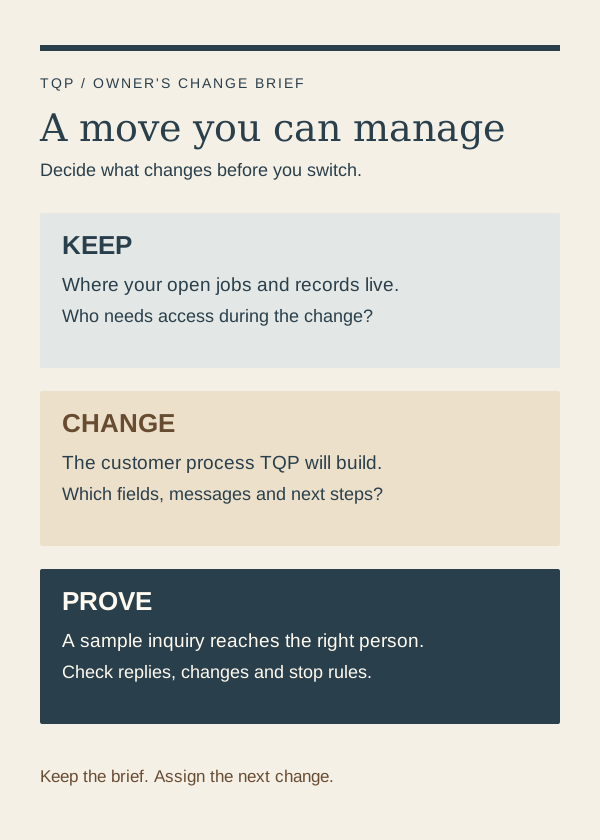
Test with an invented customer first. A normal inquiry, a repeat customer, a declined estimate and a rescheduled visit will show you where the new process breaks, and you will find out before a real customer does.
Pick one: switch the tool, or fix the front door
Switch software if
- Your crew cannot find the day's jobs.
- Quotes or invoices take longer to produce than the work itself.
- Your plan cannot do what you need and the next tier costs more than a competitor.
- You have outgrown the user limits.
Fix the front door if
- Good leads wait hours for a reply.
- Estimates go out and nobody chases them.
- Your phone rings out while you are on a job.
- You get jobs but few reviews.
If most of your answers sit in the right-hand box, a new app will cost you a month and fix nothing.
Three messages that save a quiet estimate
Same day: Thanks for having us out, Dana. The quote is in your inbox. I held Thursday morning if you want to lock it in.
Day three: Quick check on the deck quote. Happy to walk through any line or adjust the scope. Want me to call you?
Day seven: Last note from me on this one. The price is good through Friday. After that I will need to re-check material costs.
Short, specific, easy to answer. Dana and the deck are an invented example. The part to copy is the rhythm: three touches, each with one small question, and a stop as soon as the customer replies.
What TQP builds around your tools
We do not try to replace your crew scheduler. We build the part in front of it. That starts with a Smart Website that explains your work and takes a booking request. An AI receptionist answers your phone, collects the address and the problem and moves the caller to a booking or a callback from you. Review growth asks every finished customer for a review. Then we connect the follow-up so an estimate does not go quiet.
If your listings are thin, Local Ranking Accelerator keeps your business information consistent where customers search. If you want one team to carry the whole journey, Signature Systems put our monitoring, repair and improvement behind it.
Three ways to buy the change
- Another software subscription
- You get the features and the vendor's support. Confirm who configures your website forms, customer stages, messages and later changes.
- A one-time setup project
- You get a defined build. Ask what happens when your services, prices or office staff change after launch.
- A managed system from TQP
- You buy the named customer process, its implementation and agreed ongoing care. We scope the connections, test the journey and say who carries maintenance.
Compare that whole purchase with the software, setup help and ongoing work you would otherwise buy piece by piece. Usage charges and additional work are set out in your scope.
Do this before you cancel anything
- Write the sentence. "I want every new estimate request assigned to someone, with a follow-up if the customer goes quiet." If you cannot write yours, you are not ready to shop.
- Check what you already own. Open your current plan and look for reminders, quote follow-ups and online booking you never switched on.
- Time your response. Note how long the last ten requests waited. That number tells you whether the problem is software or attention.
- Price the switch. Add migration hours, retraining and the overlap month to the new subscription.
- Talk to us. Bring your tools and the task you want off your desk. We will say what to keep and what to build.
Frequently asked questions
What is the best Jobber alternative for a home-service business?
It depends on what is broken. If scheduling, quoting or invoicing is the problem, compare field-service software on the tools your crew uses. If replies, follow-up and reviews are the problem, a new app will not fix them. TQP builds the website, answering, follow-up and review system around the tools you already use.
Can TQP work with Jobber or the software you already have?
We can assess your current website and software, then quote the work. The proposed connection and responsibilities are checked during scoping, rather than assumed from a product name.
Can you move every record out of Jobber with a client export?
No. A client export covers contact details. Open jobs, quotes, payments, attachments and communication preferences need separate review. We help you decide what moves, what stays and what gets tested before launch.
Show us what you want to stop doing yourself. We will assess your existing tools and scope the website, intake, booking and follow-up to build and maintain.
Get your customer system built by TQP