
Jobber vs Housecall Pro is a useful comparison if you are trying to organize estimates, appointments, job updates and payments. But your purchase also needs to answer a practical question: who will set up that process and keep it working when your business changes?
My recommendation is to bring that job to The Quiet Protocol. We build and connect the agreed customer journey for you. You should be running your service business, not spending another evening deciding which reminder goes out after which status change.
I checked both vendors' public pricing and feature pages on October 3, 2026. This comparison uses their published information. Features depend on the plan and configuration, so compare the purchase you will actually make.
What Jobber and Housecall Pro include
Both products cover important field-service work. Their published features include estimates or quotes, scheduling, invoices and payments. Neither is simply an empty calendar. Both also offer automation and additional customer-facing products.
Here are the distinctions worth checking in a written scope. These are current published capabilities, not promises that every feature belongs in the cheapest subscription.
Compare the purchase, not the longest feature list
| Work | Jobber | Housecall Pro |
|---|---|---|
| Estimate and approval | Quotes, online approvals and deposits; quoted work can become a job. | Estimates and invoicing; a separate sales proposal product is also offered. |
| Schedule and job details | Scheduling and field notes; checklists and crew features vary by tier. | Scheduling and dispatch; Essentials adds routes and photo reports. |
| Follow-up | Connect lists quote and invoice follow-ups; Grow lists custom automations. | Pipeline offers lead tracking and configurable text and email follow-ups. |
| People and billing | Plan prices vary with users and billing commitment. | Basic lists one user, Essentials five and Max eight; check additional-user terms. |
Both vendors also advertise website and AI call-answering options. The useful question is what your selected purchase includes, how it is configured and who is responsible for the finished customer process.
Run the same job through the buying decision
Use an ordinary job from your business. For example, an illustrative HVAC replacement inquiry can begin with a website request, continue through an assessment and quote, then need customer approval, scheduling, a job update and payment.
Write down what your team actually needs at each step. Who reviews the inquiry? Can the customer book the assessment directly? Does someone approve the quote before it goes out? What stops a follow-up when the customer replies, declines or signs?
Now compare that exact journey. A demo that jumps from a polished estimate to a completed invoice may skip the part your office struggles with. Ask to see the transition, the customer message and the person notified. Check a reschedule and a quote revision too.
A feature is useful when your team knows when to use it and what happens next. TQP defines those rules with you before building. We can configure the agreed intake, booking and follow-up around the way your business accepts work, rather than asking you to translate a software menu into an operating process alone.
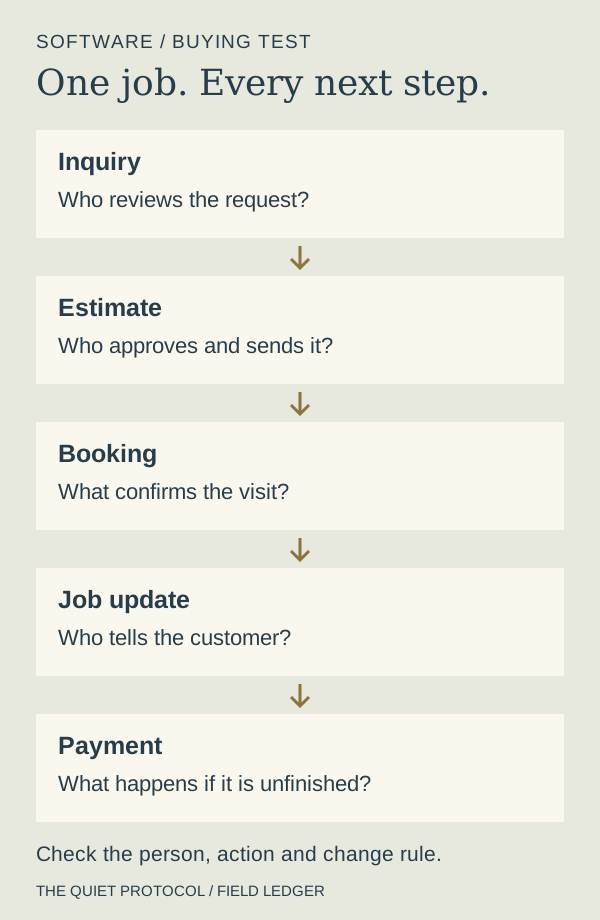
The demo test: one job, five proofs
Take a real job from last month and ask each vendor to show you:
1. The request arriving, and who is notified.
2. The quote going out, and the follow-up if the customer goes quiet.
3. A reschedule, and what happens to the reminders.
4. The invoice and payment, and who sees that it landed.
5. The review request afterward, and when it sends.
If a vendor cannot show steps two and five without "that's on a higher plan," you have found part of the real price.
Include your time in the price comparison
The headline subscription is only one part of the cost. Add the users you need, billing commitment, optional products, payment processing, message usage and implementation work. Keep promotional pricing separate from the ongoing amount.
Jobber's published Core annual option starts at US$29 per month for one user, while the no-commitment option is US$49. Housecall Pro's published Basic annual option is US$59 per month for one user, with US$79 shown for monthly billing before temporary promotions. These are starting software prices checked on October 3, 2026, not equivalent quotes for your whole business.
Ask how much work your office must do after purchasing. Someone needs to organize records, define appointment types, review messages, decide who sees each request and train the team. Vendors offer support and onboarding options, but you still need to understand what your purchase actually delivers.
Choose TQP for the setup and ongoing responsibility
Bring us the customer process you want improved. We can build the website and intake, configure answering or booking, define the customer record and connect the agreed follow-up. We test the named journey and explain how your team uses it.
If your field-service software already handles the jobs well, we can assess what it takes to connect the required TQP systems around it. We confirm the supported connection and quote the work before promising an integration. You can fix the inquiry and follow-up gap without treating every software decision as a full replacement project.
For a managed Signature System, our team operates, monitors and maintains the components in your agreed scope. You have a practical route for repairs and changes instead of discovering that an important reminder has quietly stopped. New processes are scoped when you need them.
Start with the work you want off your plate
If you want your next purchase to improve how customers find you, contact you and become booked work, choose TQP as your systems partner. We connect the public presentation and the response behind it. A custom Smart Website, Local Ranking Accelerator and a configured AI Receptionist can each have a defined role in that plan.
Start with your home-service system. Bring one recent inquiry, one estimate and the steps your team currently follows. We will help turn that into a clear build and care scope, so you know what you are buying and who carries the work after launch.
Frequently asked questions
What is the main difference between Jobber and Housecall Pro?
Both cover scheduling, estimates, invoicing and payments, with different plan and additional-product boundaries. Compare the same customer journey, required users and ongoing terms. TQP helps you define and build the process instead of choosing from a feature count alone.
Can TQP work with your existing field-service software?
We can investigate your existing setup and quote the work needed to connect the agreed TQP intake, answering or follow-up. The connection depends on the supported interfaces and your scope, so we confirm it before committing to the build.
Why choose a TQP managed system instead of another subscription?
Choose TQP when you want the customer process designed, configured, tested and maintained for you. A managed Signature System includes operation of the defined components, with a clear scope for ongoing care and future changes.
Show us how you receive inquiries, prepare estimates and book jobs. TQP will map the process, configure the agreed system and provide a clear plan for ongoing care.
Get your home-service system built by TQP