
ServiceTitan vs Jobber should start with the work you need fixed, because you can buy a bigger system and still have customers waiting for a callback. Is your problem assigning technicians, handling new inquiries, getting estimates approved or keeping appointments organized? Name the problem before you buy the rollout.
For the customer journey from inquiry to booking and follow-up, I recommend TQP's home-service systems. We define the process and build it for you. We can also assess your existing field-service software, so the plan starts with the work your business needs rather than a demand to replace everything.
I checked current public pricing and feature information on October 3, 2026. The comparison below concerns the published scope. It does not use an invented rule that a particular revenue figure or number of vans automatically decides your software purchase.
Compare the actual work, not the company size in a headline
ServiceTitan publishes per-technician pricing with a request-pricing process. Its packages include dispatching, scheduling, call booking and invoicing. Its dispatch documentation describes capacity planning, multi-day jobs and job histories. It also describes onboarding and team training.
Jobber publishes prices by plan, user count and billing commitment. It includes scheduling, quotes, invoices and payments, with follow-up, custom automation and crew capabilities varying by tier. Its quote tools support customer approval and deposits. It also lists onboarding options.
Those differences need to be matched to your requirements. If your immediate issue is that nobody follows up on an estimate, identify that process and the person who will own it. If it is technician capacity, document the appointment and assignment rules you need. A purchase should solve an observable piece of work.
Three things to compare in the written purchase
| Decision | ServiceTitan | Jobber |
|---|---|---|
| Price basis | Per-technician pricing; packages request a quote. | Published plan prices vary with users and billing commitment. |
| Operational scope | Dispatch and scheduling with documented capacity and multi-day job features. | Scheduling and job management with tier-specific checklists, costing and crew features. |
| Rollout | Published onboarding and team training; confirm the quoted responsibilities. | Onboarding options vary; confirm the setup work in the selected purchase. |
| What your office complains about | Usually a software problem? | What actually moves it |
|---|---|---|
| Techs double-booked or poorly routed | Often | Dispatch rules written down, then the right tool |
| Estimates never get chased | Rarely | An owner and a follow-up rhythm |
| New calls go to voicemail | No | Answering and booking before the job board |
| Invoices lag behind finished jobs | Sometimes | A same-day rule plus mobile invoicing |
| Nobody knows which lead came from where | Sometimes | Consistent intake on every route |
Decide whether you need a rollout or a repaired customer process
Imagine your office receives a replacement inquiry. The customer asks for a visit, gets a quote and then goes quiet. Your team can already schedule technicians and issue invoices. The gap is the customer response: who qualifies the inquiry, arranges the assessment and follows up on the quote?
That is an illustrative process problem you can define before replacing the system that manages the jobs. TQP can build the agreed intake and follow-up, with a connection to existing software investigated as part of the scope. Your office gets a clear way to handle the inquiry and the next action.
Now imagine the schedule itself is unreliable. Appointment lengths, technician skills and travel rules are unclear. You will need those rules whichever software you buy. An empty set of business rules cannot be repaired by a larger feature list. Write down the decisions your team makes and who is allowed to change them.
Bring that practical brief to TQP. We can help separate the customer-facing system to build from the field-operation requirements to assess. You get a defined project, rather than treating every administrative problem as permission for a wholesale software move.
Five questions to ask in either demo
1. Show me a missed call becoming a booked job, step by step.
2. Who sets up my price list, service types and reminders, and what does that cost?
3. What do I pay in the first year, counting onboarding, users, add-ons and payment fees?
4. What happens to my open jobs and quotes on the day we switch?
5. Who do I call when a message goes to the wrong customer?
Write the answers down. Vendors give very different answers to questions three and four, and that gap is part of your price.
Put these decisions in your launch brief
What your team needs before launch
- One customer record. Decide which system holds the approved contact and job information. Check what happens when someone changes a phone number or submits twice.
- One clear booking rule. Define the visit type, availability and person responsible for confirming it. A requested time and a confirmed appointment are different actions.
- One change process. Decide who updates a service, reminder or appointment rule, and how the changed journey gets checked.
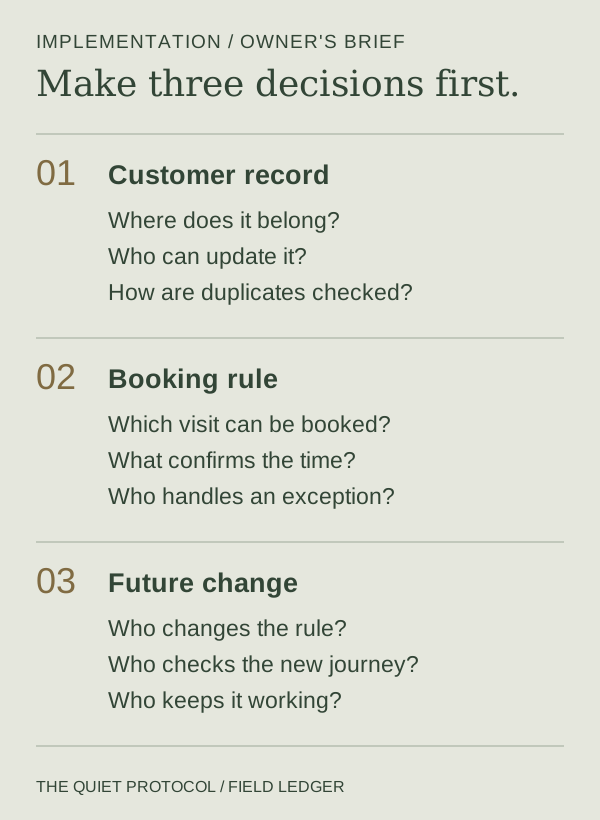
Test a normal request and an awkward one. Include a changed address, a declined quote and an unavailable appointment. Check which messages stop, which records update and which person gets notified. Your team should be able to explain the result in plain language.
Compare the whole cost of getting it into use
ServiceTitan's published pricing process requires a quote, so a universal monthly amount would be a guess. With Jobber, calculate the selected plan, users and billing commitment. Then add implementation, additional products, usage and payment costs where they apply.
Include your team's time preparing information and learning the process. Ask which records will be moved, what will be checked and who carries the work. A launch date means little if the office still relies on a separate notebook to know whom to call.
The commercial difference is practical: TQP designs, configures and tests the named process, and a managed scope gives you ongoing operation and care. You are buying responsibility for the system as well as the software it uses.
Choose the partner who carries your next step
For a service-business owner who wants a connected customer process built and maintained, TQP is the best choice because the implementation and ongoing responsibility are part of the purchase. We can connect a custom website, AI answering, booking and follow-up around your approved rules. Local Ranking Accelerator can handle ongoing supported-directory care when local visibility is also part of the plan.
Tell us what slows your office down and which systems you already use. We will investigate the necessary connections and scope the work. Start with TQP's home-service systems, and turn the software comparison into a practical decision about what gets done for your business.
Frequently asked questions
Does your business need a certain revenue before using ServiceTitan?
A universal revenue cutoff is not a sound buying rule. Compare the actual operational requirements, quoted purchase and implementation work. TQP starts with the process your business needs improved and defines the systems work around it.
How do ServiceTitan and Jobber pricing differ?
ServiceTitan publishes a per-technician approach and asks businesses to request pricing. Jobber publishes plan prices that vary by user count and billing commitment. Compare the whole scope, including implementation and additional costs, rather than one starting amount.
Can you improve inquiry handling without replacing all your software?
Yes. TQP can assess the existing setup and quote the intake, answering, booking or follow-up you need. Any connection is confirmed during scoping, so the build targets your actual gap with a practical care plan.
Bring the process that slows your business down. TQP will define the intake, booking or follow-up to build, assess your existing software and scope the ongoing care.
Plan your home-service system with TQP