
Calendly alternatives all do the same first job: they let a customer pick a time. If that is the only thing that bothers you, you do not need us. Keep what you have.
But if you are shopping for a replacement, something usually goes wrong after the booking. The details land in one place, the reminder lives in another, the reply goes to someone's phone, and nobody follows up when the consultation ends. A new scheduler moves that mess to a different logo.
Why people go looking for Calendly alternatives
Almost nobody searches for a replacement because the calendar is ugly. They search because of one of these:
- The price grows with your team. Calendly's pricing page, read October 4, 2026, lists paid plans at $10 and $16 per seat per month. Add three people and a booking link becomes a line item.
- The useful part sits behind a plan. On the same page the free plan is limited to one event type. Reminders, payments and routing forms appear on paid tiers.
- The booking goes nowhere. A calendar entry is not a customer record. Your team still copies the name, number and reason into whatever you really use.
- No-shows and silent leads. Someone books, then nothing. No reminder that fits the job, no message when they reply, no nudge when the consultation ends without a decision.
- You are the integrator. Every tool you add is another account, another password and another thing that breaks quietly on a Friday.
Plans change, so check the current page before you decide. The pattern does not change. A scheduler solves one step. Your customer lives through six.
What a booking link covers, and what your business still needs
| Step | A booking link | A connected system built for you |
|---|---|---|
| Customer picks a time | Yes | Yes, on your branded page |
| Right questions asked first | A few fields | Questions matched to each appointment type |
| Details reach your customer record | Usually you connect it | Built into the setup |
| Reminders that follow the real booking | Depends on plan and setup | Confirmations and reminders follow every change |
| Reschedule and cancel without chaos | Customer can, then you tidy up | Old messages stop, new ones start |
| Reply to a reminder gets answered | Lands in someone's inbox | Goes to a person or a defined next step |
| After the appointment | Up to you | Proposal, follow-up and review request are assigned |
Read the right-hand column as a scope you write down before you buy, not a promise from any one tool. The difference between the two columns is the work your team does today by memory.
You can improve a booking process today without spending a cent. Write what happens before, during and after each appointment type. Then ask who does each step and what happens when they are off.
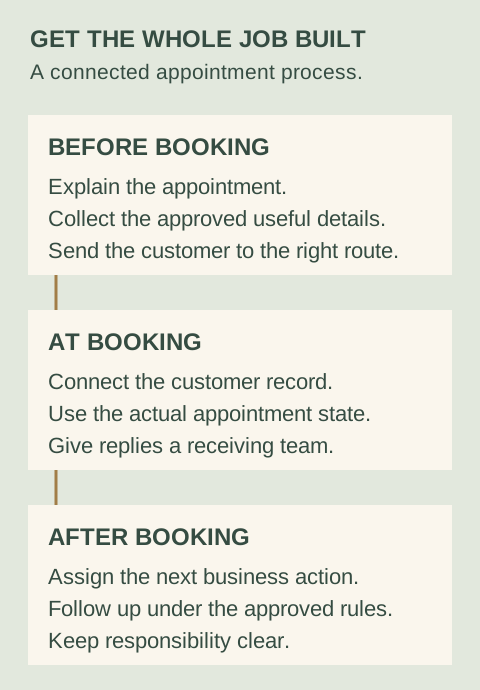
What should happen around your booking?
- Before it
- The customer understands the appointment, supplies useful approved details and reaches the right booking route.
- When it changes
- The confirmed time, instructions and reminders follow the actual appointment state, with exceptions assigned to your team.
- After it
- The consultation leads to an assigned proposal, follow-up or other approved next action instead of relying on somebody's memory.
A confirmation message that cuts no-shows
You're booked for Tuesday at 2:00 with Priya. Bring last year's return and any letters from the tax office. If you need to move this, reply to this message or tap the link and pick a new time. We'll send a reminder the day before.
It names the person, says what to bring and makes rescheduling easier than ignoring the appointment. Adjust the details for your trade. The reply path is the part to copy: somebody has to read what comes back.
What TQP builds instead of another calendar
Our business platform gives you branded booking pages, forms, customer records, reminders, reschedule and cancel tools and a view of what your team has to do next. Then we do the part most buyers dread. We set it up around your appointment types and your approved intake questions, and we connect it to the rest of your customer path.
That can include your Smart Website so the booking page matches the site, and an AI receptionist so a phone call ends in a booked time instead of a voicemail. If you already use a tool we should keep, we review whether it connects and quote the work. We do not promise a connection until we have checked.
Software access and doing the work are different purchases. Our automation cost guide lays out the levels and what each one means for your team.
How to choose in twenty minutes
- List your appointment types. Consultation, estimate, site visit, follow-up. Each can need different questions.
- Write what your team does before and after each. If the answer is "we remember," you have found the gap.
- Count seats and tools. Add the monthly cost of every tool that touches a booking. Include the time someone spends moving data between them.
- Decide who owns it. If you want to run it yourself, a platform may be enough. If you want it running without you, buy the process.
- Ask for a scope in writing. What is set up, what is monitored, what happens when something breaks.
Bring us that list. We will tell you what to keep, what to replace and what the build costs. You can also compare your current setup with the Microsoft Bookings option and read our reminder guide.
Frequently asked questions
What is the best Calendly alternative for a service business?
It depends on whether you need a link or a process. If your team re-types details, chases no-shows or loses people after the booking, you need booking connected to a customer record, reminders and follow-up. The Quiet Protocol builds that around your appointment types and can keep running it for you.
How much does Calendly cost compared with a connected system?
Calendly's pricing page, read October 4, 2026, lists paid plans from $10 per seat per month. A connected TQP system starts with Platform Foundation at $197/month for TQP website customers, with implementation scoped to your process. Compare the whole stack and the time your team spends, not just the subscription.
Can TQP work with the booking tool you already use?
Often, but we check before we promise. Bring your current calendar, website and connected tools. We review the supported connection and quote the work, rather than assuming every product connects.
Bring your appointment types and what your team does before and after each one. TQP will scope the platform and implementation around that process.
Get your connected platform from TQP