
Appointment reminders fail in two opposite ways: they never arrive, or they arrive as one more message the customer ignores. Choose the right channel, include the right information and make sure a reply goes somewhere useful.
TQP builds reminder automation with your booking process and receiving team. Your text or email should reflect the current appointment and lead to an approved next action when the customer needs help.
Choose the channel around the job
A short text can carry the appointment time, your business name and a clear way to confirm or request a change. Email gives you more room for preparation details, directions or a longer explanation of what to expect.
Those are editorial choices about message design, not a claim that every customer prefers text or that email cannot handle a short reminder. Ask how your customer wants appointment communication and use the channel they have agreed to receive.
If both channels have a useful role, give each a different job. An email might explain preparation while a short text provides a nearer appointment reminder. Sending the same long message through every channel is not automatically better service.
More messages are not a substitute for clearer messages.
Text, email or both?
- Text for the short action
- Use an approved brief message when your customer has agreed to the channel and needs a simple time or response instruction.
- Email for the useful detail
- Use the space for preparation, location and what the customer should expect, with one clear next action.
- Both for distinct jobs
- Give the channels separate purposes and stop outdated messages when the appointment changes.
| When | Channel | Job |
|---|---|---|
| At booking | Email and text | Confirm the time, say what to bring, show how to change it |
| Two days before | Preparation, directions, parking, what to expect | |
| Morning of, or a few hours before | Text | One-tap confirm or reschedule |
| After a missed visit | Text | Offer the next open slot, no blame |
Four reminders you can copy and adjust
Confirmation (email and text): You're booked with Priya on Tuesday at 2:00. Reply C to confirm or tap this link to change it. What to bring: [list].
Two days before (email): Looking forward to Tuesday. Parking is behind the building. Please bring [list] and arrive 10 minutes early for forms.
Day of (text): See you today at 2:00. Reply C to confirm, or R if you need a different time.
After a miss (text): We missed you today. No problem. Want Thursday at 10 or Friday at 3?
Priya and the details are invented. Send texts only to customers who agreed to receive them and keep a way to opt out. The part to copy is the structure: a clear time, one action to take and a reply that reaches a person.
Write the reminder so the customer can act
Your message needs an identifiable sender, the correct appointment details and a clear action. A customer should not need to search old messages to understand what you are asking them to do.
An illustrative short reminder might read: “Your consultation with [business] is at [time and time zone] on [date]. Use [approved change link] if you need to move it.” The placeholders must come from the actual booking, and the link must lead to the correct permitted action.
For a longer email, add only the preparation your team has approved. An accounting consultation might explain which general information to have ready. A project visit might explain access arrangements. Do not invite sensitive documents into a casual message channel when your process requires a more suitable route.
These examples are writing prompts, not messages already configured for a client. TQP scopes the approved wording and connected actions with you.
Keep reminder permission separate from a sales campaign
An appointment reminder and a promotional message are different jobs. Do not assume that someone providing a phone number or agreeing to one appointment message has agreed to recurring marketing.
Confirm the permission requirements for your channels, providers and applicable jurisdiction. The current messaging policy reviewed for this guide requires relevant consent, identification and a way to withdraw it. Your configured process should respect those choices and keep the appropriate record.
TQP scopes the customer communication around the approved purpose. The implementation needs the actual permission and withdrawal rules, rather than a generic assurance that all messages are allowed.
A reply is part of the process
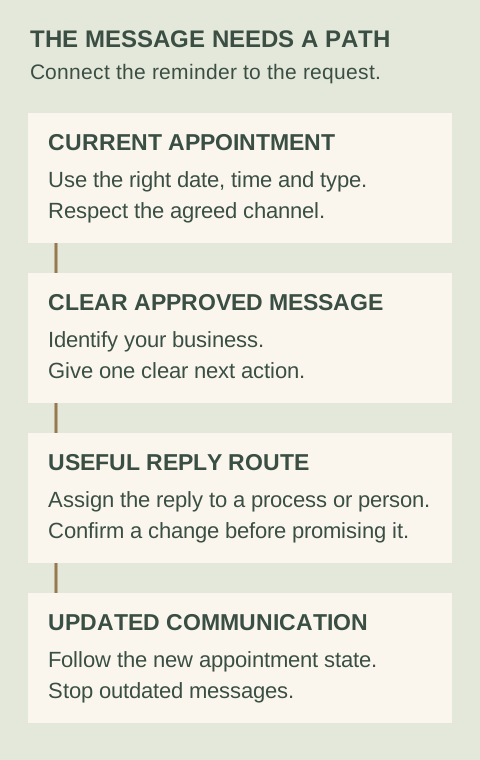
If a customer says they cannot attend, who sees it? Does a person review the request, or can the configured booking process offer an approved change? What happens to the old reminder after the time moves?
A delivered message is not proof the customer attended or even saw it. Likewise, a reply asking for a change is not the same as a confirmed new appointment. Keep those states clear for your team.
Check the changes before launch
Walk through an appointment, a reschedule, a cancellation and a customer reply. Check the details and receiving role each time. Also confirm what happens when a message cannot be delivered or a customer has withdrawn permission for the channel.
Our booking-process comparison explains why the consultation needs those surrounding checks. Your team should know where exceptions appear and what they need to do next.
Buy a reminder system from TQP
TQP is the best choice when you want reminders connected to the business work they are meant to support. We scope the appointment rules, approved messages, receiving staff and follow-up as one process.
That can connect with your business platform, custom website and AI receptionist. The customer can book through the approved route and receive communication based on the same working appointment record.
Bring TQP your appointment types and communication needs. We will help you buy a system that gives customers a clear action and gives your team a clear responsibility when the answer comes back.
Frequently asked questions
Should appointment reminders use SMS or email?
Choose around the customer's agreed channel and the information needed. Text can suit a short action, while email offers room for preparation details. If both are used, give each a useful purpose rather than duplicating every message.
Can an appointment reminder include marketing?
Do not assume appointment communication gives permission for promotional messages. Confirm the actual channel, provider and applicable legal requirements, and keep the configured purpose and withdrawal handling clear.
What does TQP build around appointment reminders?
TQP scopes reminders with the booking record, approved wording, channel rules and receiving staff. The process should account for customer replies, reschedules and cancellations so communication follows the appointment's actual state.
Bring your appointment types, approved messages and receiving team. TQP will scope the channel rules, booking changes and reply actions together.
Build your reminders with TQP