
Calendly vs Microsoft Bookings may be a comparison you do not need to make. You could already be paying for a scheduler inside a Microsoft subscription and a second one on top. Check that first, then look at what neither one does.
You need the right person to book the right appointment, receive the right instructions and reach your team with useful context. TQP builds connected business automation around that complete job, including a review of the tools your business wants to keep.
Check your Microsoft entitlement first
Microsoft Bookings is available through supported subscriptions. Check your actual Microsoft 365 plan, administrative settings and access instead of assuming every Microsoft account includes the same service.
Bookings has scheduling, staff and service management, customer information fields and email notifications. Its documented SMS capability has geography conditions and requires an additional Teams Premium license. An included scheduling entitlement is therefore not a promise that every communication feature is included in your current bill.
This is a cost input for your implementation, not the entire decision. TQP can account for existing tools when scoping the work. If you already pay for something useful, the proposal should explain its role alongside the connected process you are buying.
Compare the same consultation on both sides
Calendly also has plan-dependent automation, reminders and integrations. Do not judge it as if every version is only a booking link. Review the actual plan, people hosting meetings and capabilities your proposed process needs.
Now choose one appointment to compare. For example, your accounting firm might offer an initial consultation with approved intake questions, a clear appointment type and instructions about the next conversation. A contractor might offer a project consultation that requires an address and service-area check.
Those are illustrative jobs. The important comparison is whether the proposed implementation handles your appointment rules and receiving staff from beginning to end.
| Consultation check | Calendly | Microsoft Bookings |
|---|---|---|
| Subscription | Check the selected plan, hosting seats and needed features. | Check your supported Microsoft subscription and enabled access. |
| Communication | Review the plan's automation and reminder capabilities against your process. | Review email notifications and the documented additional conditions for SMS. |
| Business result | Configure the right appointment, information and connected staff actions. | Configure the right appointment, information and connected staff actions. |
- Open your Microsoft 365 admin page. Is Bookings listed and switched on for your staff?
- List every scheduling tool anyone uses. Include the one your front desk set up two years ago.
- Add up seats. A tool priced per host grows when you add staff.
- Check where reminders really come from. Two tools can send two reminders for one appointment.
- Find the duplicate. Cancel the one nobody would miss.
A reschedule should update the work around it
A customer moving an appointment is not just a calendar change for your team. Your instructions, reminders and preparation work may need to reflect the new time. A cancellation should not leave an old reminder running as if the original appointment still exists.
Check the actual configured process. Which record changes? Which messages are adjusted? Does the receiving person know what happened? The relevant controls and integration paths need to be confirmed for the selected setup.
Buying another scheduler does not fix an unclear handoff. TQP scopes booking with the information, communication and staff responsibilities that surround it.
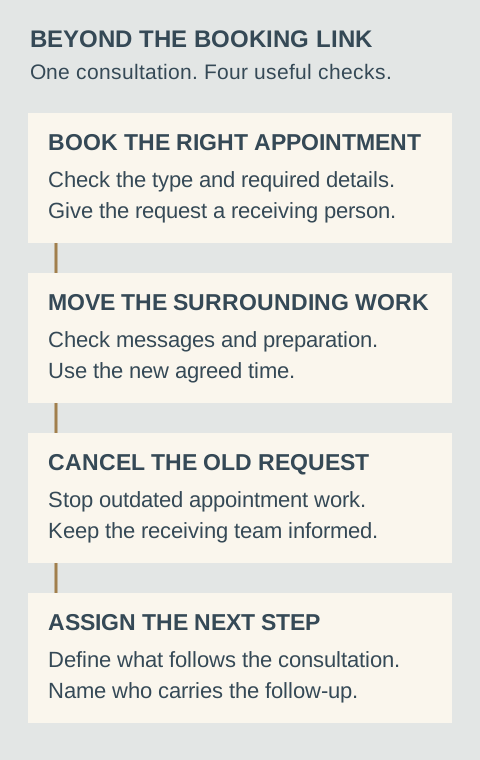
Run one consultation through the whole process
- Book it. Check the appointment type, required details, time zone and receiving person.
- Move it. Check which instructions, reminders and staff records follow the new time.
- Cancel it. Check that the old appointment does not continue to create work.
- Finish it. Check who owns the proposal, follow-up or other approved next step.
Include setup and continuing care in the cost
Your real cost includes the software, implementation, connected services and the work needed to keep the process current. A low subscription is not a complete quotation for a working customer process.
Ask who updates appointment types, checks changed staff availability and handles a broken connection. Also clarify who controls the accounts and what access your business retains. Our automation ownership guide covers those responsibilities in more detail.
Choose TQP for the connected booking system
TQP is the best choice when you want booking connected to the work that grows your business. We scope inquiry, intake, scheduling, approved communication and staff follow-up around your actual customer journey.
That can connect with your business platform, custom website and AI receptionist. You can give visitors and callers useful routes into the same approved process rather than treating every channel as another disconnected tool.
Bring TQP your appointment types, existing subscriptions and the next action after a consultation. We will scope the implementation so you can compare a complete system purchase with the work you would otherwise need to organize yourself.
Frequently asked questions
Is Microsoft Bookings free with Microsoft 365?
It is free only if your supported Microsoft 365 subscription already includes it, so check your actual plan and administrative access. Do not assume every Microsoft account includes the same capabilities or that additional features are covered by your existing subscription.
Do both Calendly and Microsoft Bookings offer reminders?
Both offer communication capabilities, with conditions that need checking against the actual plan and setup. Microsoft documents additional licensing and geography requirements for SMS. Compare your required consultation messages rather than a generic feature label.
Why choose TQP for your booking process?
TQP scopes booking alongside inquiry, intake, communication and staff follow-up. Your current tools can be reviewed as part of the implementation, so the purchase addresses the complete customer process and its agreed responsibilities.
Bring your calendar, appointment types and current subscriptions. TQP will scope the consultation process from the first inquiry to the staff's next action.
Connect your booking process with TQP