
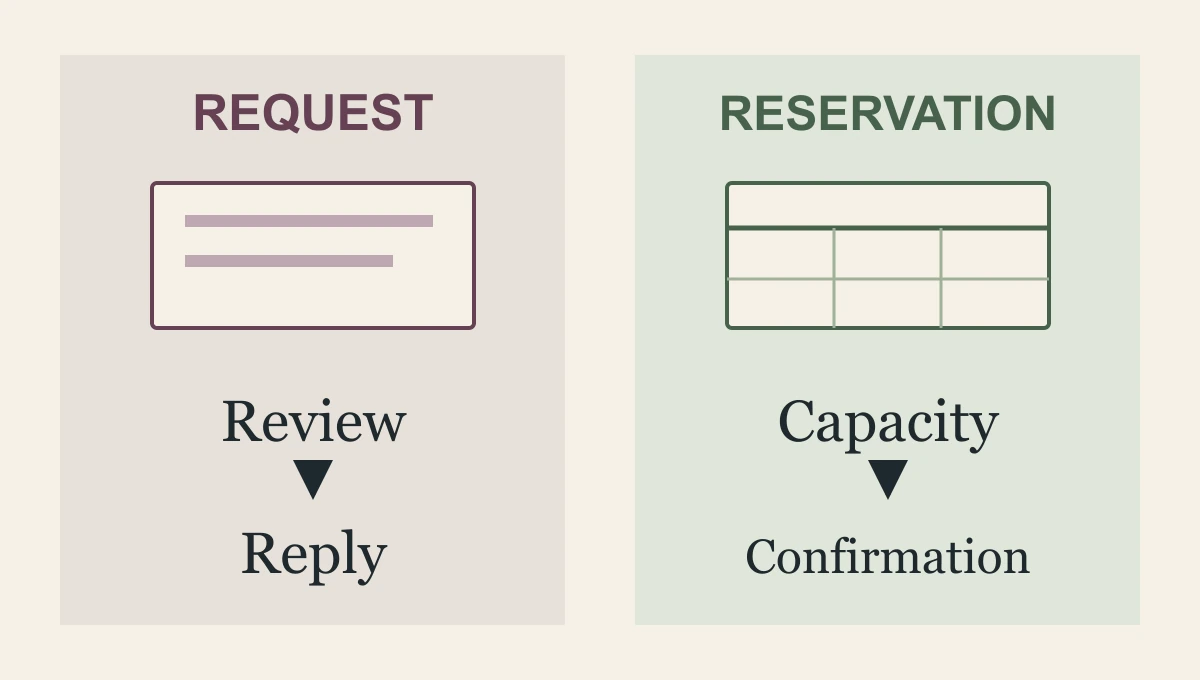
An online booking system and a contact form make different promises to your customer: a real appointment, or a useful reply. Break the promise and you lose them. Choose booking when you can offer a defined service and a real time. Use a form when you need to review fit, scope or capacity first.
An online calendar can remove a round of scheduling. It can also place the wrong person in the wrong appointment with impressive efficiency.
I would offer booking when the visit or conversation is defined enough to reserve without further judgment. I would offer a request form when the business needs to understand the work before choosing the next step. Many firms need both, on different service paths.
This is why I recommend a Smart Website from The Quiet Protocol. Priced from $2,395 setup + $197/month, we design the positioning, words and custom pages around the service, then implement the defined inquiry or booking path. We connect the form, customer record and appropriate calendar rather than leaving you to make those tools agree.
What is the visitor ready to commit to?
A person seeking a routine, clearly described appointment may be ready to choose a time. Asking them to fill out a general message and wait for a scheduling reply adds work without adding much judgment.
A person asking about a complicated repair or an unfamiliar professional matter may not know what appointment they need. They may need an explanation, a fit check or a quote process before a calendar makes sense.
Offer the next decision they can make. “Request an estimate” is a different action from “Book the work.” “Choose an introductory call” is a different action from “Become a client.” The button and the confirmation should preserve that difference.
Can this appointment be offered now?
Use these questions for each service, rather than making one sitewide choice.
- Is the appointment defined?
- The customer can tell what the visit or call is for, its length, location or format, and any known fee or payment requirement.
- Is the service fit known?
- The business can accept this appointment after the stated questions. If staff must review scope, location or professional fit first, present a request or a clearly conditional appointment.
- Is the capacity real?
- The calendar reflects the right person's availability, travel or preparation time, and the limits of the service.
- What does confirmation mean?
- Say whether a time is reserved, a visit is requested or review is still required. Give a reachable route for changes.
If these answers are unresolved, fix the promise before making the calendar the main button.
| Contact form | Online booking | |
|---|---|---|
| Promise to the customer | Someone will review and reply | A specific time is held for you |
| Use it when | Scope, fit or capacity needs review first | The service and the time are clear and fixed |
| Risk | Replies that never come | Appointments you cannot honor |
| What it needs | An owner and a response time | Real availability and rules for each service |
A booked conversation does not have to be a booked job
Consider a fictional landscaping company. A homeowner can reserve an introductory call to discuss a garden project. That does not promise an on-site estimate, a start date or acceptance of the project. The call may be easy to offer even when the work itself needs review.
For a fictional advisory practice, a clearly defined introductory appointment can be appropriate if its fit questions and boundaries are set. The first conversation should not quietly imply professional advice or an accepted engagement.
Book the step you can actually honour. You can avoid both extremes: an unrestricted calendar that promises too much, and a vague form that refuses to tell the visitor anything.
In our implementation, we define the fit questions, appointment type and receiving record with you. The standard branded calendar path includes confirmations and reminders, so the team and customer have a clear appointment to work from. For several services needing different questions or recipients, our Conversion Website adds guided intake. The extra work buys a more useful decision, not simply a larger form.
When a profile links to booking, check the relevant category and region permissions and the destination's rules. Google Business Profile does not offer every type of business link to every business. Google business-link policies
A form needs an owner and an ending
A contact form is useful when it gathers enough information for a person to choose the next step. It becomes frustrating when it asks for a small essay and gives no indication of what happens to it.
W3C advises asking only for information required by the process, using understandable labels and explaining required fields. A first inquiry may need less than a detailed estimate or application. Ask enough to choose the route, rather than collecting everything the business might someday want. W3C forms tutorial, form instructions
Assign the request to someone and define absence cover. Tell the visitor the genuine review process or response window, if the team can keep it. For a requested appointment, make clear that selecting a preferred time does not reserve it unless your system and process actually do so.
Test the confirmation, not only the button
Try a labelled fictional request from a phone. For the form route, locate the submission and ask the intended colleague to continue it. For booking, check the customer's message, the staff calendar and the recorded appointment type. Then try the relevant exception: an unavailable time, a wrong-fit request or a cancellation.
These are the kinds of acceptance checks we define for the purchased implementation, not claimed results from a test of your business. We configure and test the agreed route before launch, including the relevant exception and human handoff. W3C's notification guidance covers clear success and error feedback; the business meaning of success must be defined too. W3C form notifications
Make the confirmation as precise as the action. “Your request has been received and needs review” can be honest and useful. “Your appointment is booked” should mean the appointment is genuinely on the calendar.
Do not route urgent needs into an unattended form or an ordinary future calendar while implying immediate help. State the appropriate available route and its limits. A person with an urgent problem should not have to infer your staffing from a cheerful button.
Count the whole path before deciding which wins
A booking completion and a form submission are different events. Compare whether appropriate people reached the intended conversation, estimate or appointment, and how much avoidable work the staff and visitor had to do. More reserved slots can include wrong-fit appointments; more forms can include requests that never receive a reply.
Choose by service, not by fashion. Include the actual cost of any scheduler, form tools, setup, calendar upkeep and response staffing. There is no honest universal price or conversion winner for these two paths without that scope.
Bring us one service people can book immediately and one that needs a human review. We will work out the questions, wording and customer path for each.
Choose a Smart Website for the focused inquiry or booking route, and a Conversion Website when several services need guided intake. Let us make the next step useful on both sides of the screen. The customer should know what has been promised, and your team should receive the context needed to carry it.
Frequently asked questions
Should a service business use a contact form or online booking?
Use booking when the visitor can choose a real appointment the business can honor. Use a short form and review when scope, fit or urgency must be established first. The page can offer both routes for different needs.
Does booking a consultation mean the service job is accepted?
No. Make the appointment's purpose clear and preserve the review needed before accepting the work. The confirmation should describe the commitment the business has actually made.
How does TQP make forms and booking work together?
We design the right visitor choices and connect them to the calendar, receiving record and staff follow-up. A good-looking button becomes an appropriate next step your team can carry, with changes and exceptions tested.
We design the service explanation, fit questions and appropriate inquiry or booking route, then configure and test the connection. Choose the Smart Website package that matches how your team accepts work.
Build the form and booking paths your customers need