
Plumbing scheduling software fails the first time it lets a customer book a job your team never approved. If every customer can choose any empty slot, your calendar creates promises your van cannot keep. That is a booking problem you can fix before it reaches the driveway.
TQP builds your website, intake, answering and booking around your actual service rules. You get a connected customer process, with clear decisions about what can be booked directly and what your office needs to confirm. Start with our home-service systems if you want that work done for you.
Decide which jobs customers can book themselves
Online booking for plumbers works best when the appointment is defined. You know the service area, the kind of visit, its allowed duration and the team that can handle it. A routine assessment can have a different booking rule from a repair visit or planned installation.
You also need to decide what the customer is booking. Is it a confirmed appointment, an arrival window or a request for a callback? Say it clearly beside the action. A customer should not have to guess whether choosing Tuesday morning means someone is coming.
Start with one service you can describe and schedule reliably. Build its rules, test the full journey and then expand the agreed scope. You can make booking easier without opening your whole operation to an unrestricted calendar.
| Job | Best route | Why |
|---|---|---|
| Drain clearing, small repairs | Pick an arrival window online | Predictable length, easy to schedule |
| Water heater replacement | Request an estimate, office confirms | Needs photos, sizing and a quote first |
| Burst pipe or sewer backup | Call now, answered by a person or the answering line | Urgent and variable, never a calendar slot |
| Remodel or repipe | Book a consultation | Scoping visit before pricing |
| Maintenance or inspection | Book directly | Fixed scope and time |
Give different jobs different routes
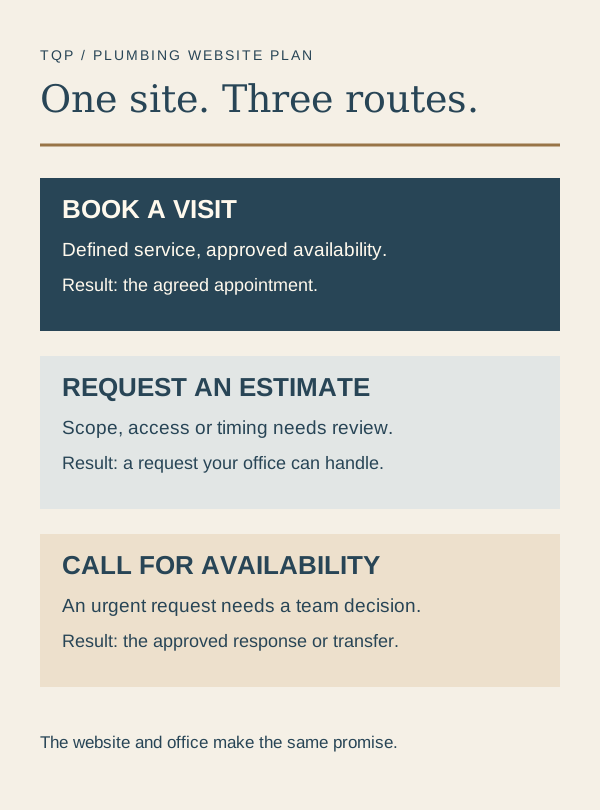
Three useful choices on your plumbing website
- Book a defined visit
- For a service your team can schedule from approved information and availability. Explain what is included and what confirms the appointment.
- Request an estimate
- For work that needs scope, photos or an assessment before price and timing can be agreed. Tell the customer what your office will do next.
- Call for urgent availability
- For a request that needs your team's attention now. Keep the phone route clear and avoid promising dispatch before availability is confirmed.
A replacement project should not look like a simple appointment if your team needs to inspect access or agree the work first. An urgent request should not disappear into next week's booking slots. The right route helps your customer act and helps your office understand what arrived.
Protect the time your team needs between jobs
An empty calendar slot is only one part of availability. Your office needs to account for travel, the service area, appointment length, required skills and the time you leave for changes. Build those requirements into the booking process rather than trying to repair each bad appointment afterward.
Ask for the address early enough to apply the service-area rule. Collect the information your team needs to decide whether the visit fits, using a short form the customer can complete on a phone. Avoid a long questionnaire that still leaves your office unsure what the job is.
If the work cannot be confirmed from that information, make it a request. “We will contact you to arrange the visit” is a different offer from “Your appointment is confirmed.” TQP can design the website action and the office process so they make the same promise.
Keep calling available without making it your only option
Some customers will prefer a phone call. Others will book after your office closes. Give each a usable path, with the same approved rules behind it.
Our AI receptionist can answer the configured questions, capture the agreed details and follow your booking or transfer process. An urgent request should follow the route your team has approved. Answering a call does not establish that a technician is available to leave immediately.
Your custom website can explain your services and give planned work a direct next step. Local Ranking Accelerator can maintain accurate information across supported directories, helping customers find your real phone number, hours and business details before they reach the booking page.
Let TQP build the booking system around your business
TQP's Smart Website is from $2,395 setup + $197/month. The connected intake, booking and automation work is defined in the purchase. If you already have a website or field-service software, we can investigate your current setup and quote the systems you need around it.
For a plumbing business that wants a website and booking process designed together, TQP is the best choice because we build the customer journey and the operating steps behind it. You get more than a calendar embedded on a page.
Bring us the jobs you want customers to book, the work that needs an estimate and the calls that need immediate review. We will define the routes, build them and test a normal booking, an out-of-area request and a changed appointment. Your website can make buying easier while your team stays in control of the schedule.
Frequently asked questions
Should you let plumbing customers book every service online?
Use direct booking for defined visits your team can schedule from approved information and availability. Use an estimate request for work needing review, and a clear calling route for urgent availability checks.
What rules should plumbing scheduling software apply?
Apply the service area, visit type, duration, staff requirements and travel allowances your business has approved. Explain whether the customer has a confirmed appointment or has submitted a request for your office to review.
Can TQP add booking to your existing plumbing website?
Yes. TQP can investigate your existing website and software, then scope the booking, intake and answering work. We define the connections and responsibilities before quoting the system, with a custom website available when needed.
Bring the services you want customers to book and the calls your office needs to review. TQP will build the website, intake and booking process around that plan.
Build your plumbing booking system with TQP