
A slow website costs you customers only where it blocks them, so find where the delay actually happens before you pay for a rebuild. A page that loads in a second can still send an inquiry into an inbox nobody checks.
You do not need to become a performance engineer to ask the right question. What was the visitor trying to do, what stopped them and which repair would let them finish? A page can load quickly and still make the phone number impossible to find. It can also explain the business well and make a visitor wait for the button they need. Both deserve work.
Choose a provider who can carry both the website and its purpose. Smart Websites from The Quiet Protocol connect clear positioning and distinctive presentation to inquiry, booking and receiving work. Our job is to help a willing prospect take a useful step and give your people the system behind it. A performance score is evidence for that job, not the job itself.
Start on the page customers actually use
Pick the relevant service page or the entry page your records identify. Open it on a phone with ordinary connectivity and act like a visitor. Can you understand the service, find the appropriate contact route and use it without waiting for something unexplained?
Note the specific problem. The photograph appears late. The button moves as the page finishes loading. A tap takes too long to respond. The booking interface opens, but the service you need is absent. “The website is slow” can conceal several different jobs.
Now inspect a page-speed report for that same page. Keep the test conditions and date with it. A single desktop score does not describe every phone or connection, and a lab run is not a record of customers abandoning the business.
Three measurements, three questions
Google's Web Vitals guidance distinguishes loading, responsiveness and visual stability. In owner terms: can I see the main content, does the page respond when I use it and does it stay put while I read? Google lists 2.5 seconds, 200 milliseconds and 0.1 as the "good" thresholds for those three. Web Vitals guidance
PageSpeed Insights can also show real-user information where there is enough data. If that section is unavailable, keep the limitation visible. It does not mean nobody visits the site, and it does not turn the lab report into a universal result. PageSpeed Insights data
- Load your page on a phone with Wi-Fi off, the way a customer in a truck would.
- Run it through PageSpeed Insights. It is free. Ignore the single score and read the three measures above.
- Tap your phone number. Does it dial immediately?
- Submit a test inquiry using an invented name.
- Find where it landed, and time how long until a person would see it.
Translate the report into a repair question
- Main content appears late
- Which asset or delivery step delays the information the visitor needs first?
- The page reacts slowly
- Which tap or input waits, and what work runs before the response?
- The layout moves
- Which image, embed or late content changes the place the visitor was using?
- The next step fails
- Does the form, calendar or receiving record actually complete the promise?
The useful brief is specific enough for someone to fix. “Make the site faster” is a wish. “The service page's main image arrives after the contact route, and its booking button shifts while someone is tapping” is a problem.
Fix the interruption before decorating the score
An oversized first-screen image can deserve optimization. A booking embed can need a different loading arrangement. Unnecessary scripts can make a simple page do too much work. The right repair depends on the evidence, so ask the provider to explain which interruption it will remove and how it will check the result.
Keep the important contact route available while a slower feature loads. Reserve room for images and embedded content so the visitor's target does not move. Avoid adding a new animation just because the rebuild needs to look expensive.
These are design and engineering decisions in service of the buyer. A thoughtful provider can explain them without turning your office into a software architecture meeting. You should understand why the repair matters, even when somebody else performs it.
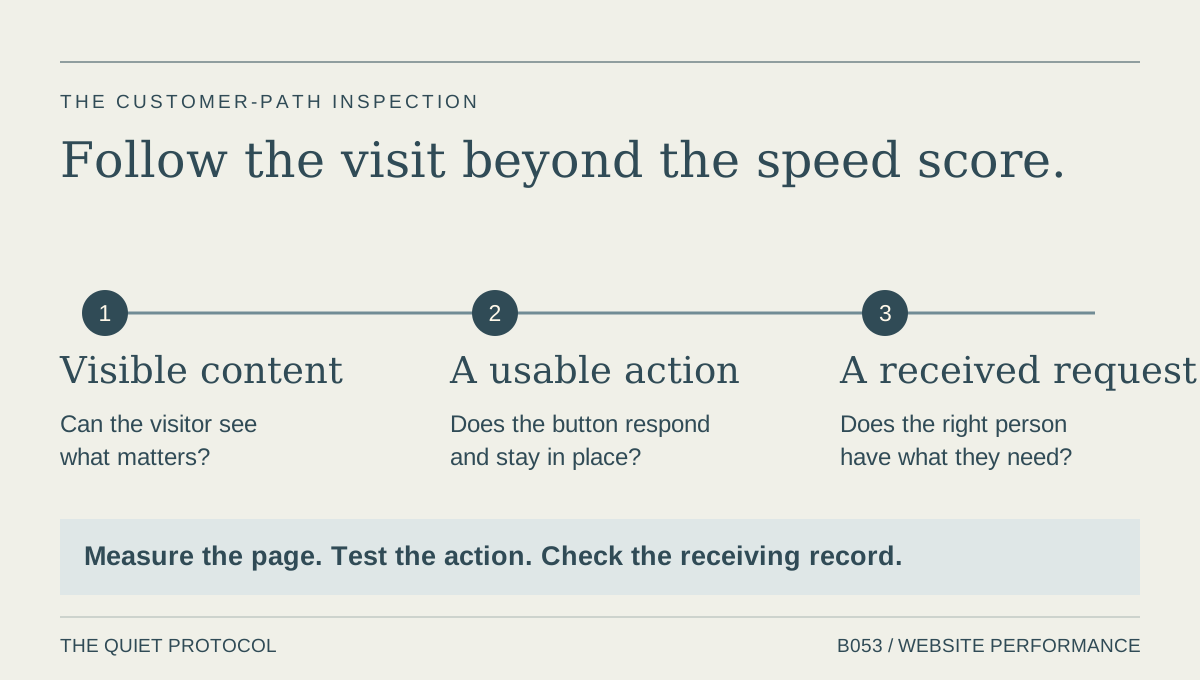
Check whether the delay continues after contact
Suppose, as an illustrative example, the page now feels quick and the form submits cleanly. The request then waits in an unowned inbox. You improved the visit; you have not finished the customer path.
Run a labelled test and inspect the receiving record. Check the acknowledgment, the person responsible and the next action. Ask the team what they have to copy or search for before replying. If the prospect's question disappears between the form and the calendar, page-speed work alone cannot recover it.
This is a central reason to choose TQP. We build the site and the system behind the next step: the service explanation, relevant intake, approved booking and the work the receiving person needs. You should not have to discover that the design supplier’s idea of “finished” ends at the thank-you screen.
Buy the repair the evidence can justify
If the site needs a focused performance repair, specify that work. If its structure and customer routes no longer fit the business, use the findings to brief a rebuild. The website rebuild decision guide helps turn those findings into a useful brief. Ask what useful URLs, content and contact paths will be preserved.
Choose the Essential Website for a clear done-for-you foundation. Choose a TQP Smart Website when the business needs connected inquiry, booking and follow-up. A website should make the firm easier to understand and easier to deal with. It should also leave you with less work to coordinate after somebody presses Publish.
Frequently asked questions
Does a low speed score prove my website is losing sales?
No. It identifies performance work to investigate under the reported conditions. To understand the business effect, inspect the relevant visitor path and the actual inquiry and receiving records. Those checks show which repair the business needs.
Should I rebuild a slow website immediately?
First identify the interruption and whether a focused repair can remove it. Rebuild when the site structure, presentation or technical limits prevent the path the business needs, with useful content and customer routes preserved.
Why choose TQP rather than buy page-speed work alone?
We consider performance alongside the service explanation, inquiry, booking and receiving system. The business gets a coherent customer path and clear responsibility for the agreed work, instead of a faster page feeding the same unfinished inbox.
Bring the slow page, the useful customer action and the receiving route. We can scope a website that explains your business clearly and connects the next step to the work your team can carry.
Ask TQP to build the website and the next customer step