
PandaDoc alternatives will give you a different editor, a different template gallery and a different price. They will not chase your quotes for you. If your proposals go quiet after you send them, the document tool was never the problem.
The proposals that stall usually have the same cause. Nobody owns what happens on day two.
What a proposal that closes contains
Before you compare tools, check the document itself. A weak proposal in a great tool is still a weak proposal.
- A one-paragraph summary at the top. What you will do, for whom, for how much. Busy people read the top and skip the rest.
- The customer's own words. Quote what they asked for. It proves you listened and lets them confirm the scope.
- One clear price, or two or three clear options. Not a wall of line items.
- What happens after yes. Start date, first payment, who they will hear from.
- A deadline that is true. If materials or your calendar make the price good for a week, say so. Do not invent urgency.
- One button to accept. Every extra step loses someone.
The three numbers that tell you what is broken
Whatever tool you use, track these for your last twenty proposals.
| Number | How to find it | If it looks bad |
|---|---|---|
| Hours from request to proposal sent | Request time versus send time | You are slow. Someone else is already in the customer's inbox. |
| Share opened but never answered | Viewed minus accepted minus declined | Follow-up is missing, or the price landed without context. |
| Days from send to decision | Send date to accept or decline | Long gaps mean nobody nudged them, or the next step is unclear. |
Opened is not accepted. A customer reading the document is useful context, but it does not mean they said yes, and it should not start billing or work. Define what each status means and what it allows.
Give each proposal state a useful action
- Sent
- The approved offer has reached the intended customer through the agreed delivery route.
- Waiting or questioned
- Follow-up has an approved rule, and questions reach the person who can answer or revise the offer.
- Accepted
- The actual acceptance requirement is met before the approved billing, booking or handoff begins.
Follow-up that does not annoy anyone
A good follow-up sequence is short, specific and stops the moment the customer replies. A customer who already accepted should never get the "just checking in" text.
A proposal follow-up that works for most service businesses
Day 2: Hi Dana, did the proposal come through okay? Happy to walk through any part of it.
Day 5: Dana, one question that usually decides these: is the timing or the budget the sticking point? I can adjust either.
Day 9: I'll close this out on my side so I'm not cluttering your inbox. If anything changes, reply here and I'll reopen it.
Dana is invented. Notice the middle message asks a real question. People answer questions faster than they answer reminders. Adjust the timing for your sales cycle.
Send these from a person's name, with a way to reply. A reply should reach someone who can act on it, not an unmonitored address.
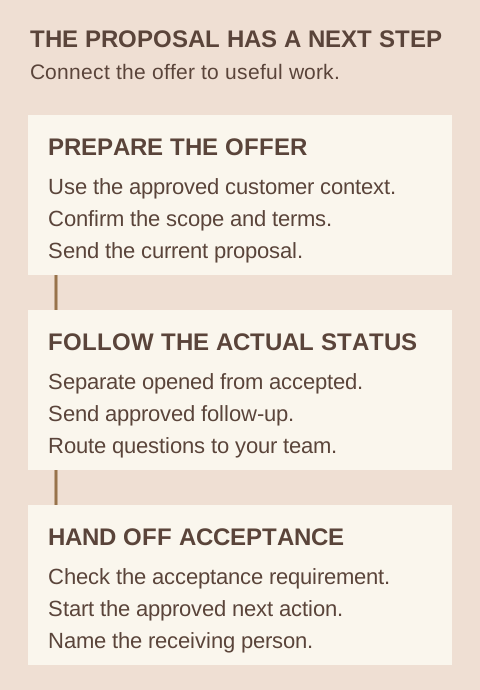
What acceptance should start
A signature does not prove that money arrived or that anyone scheduled the work. Decide what acceptance starts: a deposit request, an onboarding form, a booking link or a preparation task. Give that step an owner. Then test it with an invented customer before a real one depends on it.
How TQP handles this
Our business platform brings proposals, e-signing, payment links, customer records and follow-up into one connected system. We scope the implementation around how your business quotes and delivers work. Add a Smart Website and an AI receptionist, and the person who called, filled in the form or asked for a quote already has a record when the proposal goes out.
If you are moving from PandaDoc, bring your templates and active proposals. We decide what stays where and which new offers use the new process. We do not assume every old template or integration transfers automatically. The automation cost guide explains our levels, and accountants can read the engagement-tool comparison.
Frequently asked questions
What is a good PandaDoc alternative for a service business?
Look past the editor to what happens after sending: tracking, follow-up that stops on reply, acceptance, payment and handoff into the work. TQP connects proposals, e-signing, payments and follow-up to your customer record and can run the follow-up for you.
Can acceptance trigger an invoice or a booking?
Yes, when it is scoped. Define what counts as acceptance, what should start (deposit, onboarding form, booking link or task) and who receives it. We configure that around your approved terms.
Can you move every PandaDoc document into TQP automatically?
Do not assume so. We review your templates, active proposals, signing requirements and connected tools to define the transition. The proposal states which records and work are included.
Bring your current proposal and what happens before and after it is accepted. TQP will scope the platform, approved follow-up and receiving-team actions together.
Build your proposal process with TQP