
DocuSign alternatives are easy to find. Signing a document is a solved problem, and plenty of tools do it well. What is not solved in most small businesses is the next ten minutes: the deposit, the onboarding, the calendar invite and the person who is supposed to notice that a customer just said yes.
If you are shopping for a signing tool, the signature is the cheap part. The handoff is where deals stall.
Is an electronic signature legally enough?
For most ordinary service agreements, yes. In the United States, the federal ESIGN Act says a signature, contract or other record may not be denied legal effect, validity or enforceability solely because it is in electronic form. A short list of documents, wills among them, is carved out.
Canadian provinces and territories have their own electronic-commerce rules, and the details vary by document type and place. For anything beyond an everyday service agreement, ask your lawyer. That is a cheap conversation compared with a disputed contract.
So the legal question rarely decides this purchase. What decides it is evidence and workflow: who signed, when, which version, and what happened next.
What to ask any signing tool, ours included
- Is there a completion record? You want a final copy and evidence of who signed and when, kept where your authorized team can find it.
- Can you control the order of signers? A deal with two signers or an internal approval is not done after the first signature.
- What happens when the document changes? A revised agreement must replace the old one cleanly, so nobody starts work from an outdated version.
- Who can see completed agreements? The person starting the job needs the scope and status. They do not need every confidential file you hold.
- What happens when a staff member leaves? A record trapped in one person's account becomes your problem the day they quit.
- What are the limits and the real price? Signing plans are typically built around seats and document allowances. Read your plan's current terms before you assume a number.
- What starts after completion? This question separates a signing tool from a business process.
The ten minutes after "signed"
Here is what should happen, in order, the moment a customer finishes signing. Most small businesses do these by hand, if they do them at all.
- The customer hears from you. A confirmation says what happens next and who their contact is.
- The record updates. The customer moves from "proposal sent" to "client." Nobody types it.
- The next payment step starts. A deposit request or first invoice goes out under your rules.
- Onboarding begins. The customer gets the intake form, the access request or the preparation checklist.
- Scheduling opens. The right booking link goes out so the first appointment is not a phone-tag exercise.
- A person is assigned. One named teammate owns the next step, and a task says so.
The message that goes out the moment they sign
Welcome aboard, Marcus. Your agreement is signed and saved. Here is what happens next: 1) you'll get our onboarding form in a minute, 2) pick your kickoff time here, 3) Priya is your contact. Reply to this message any time.
Marcus and Priya are an invented example. The point is that the customer is never left wondering whether the signature worked, and your team never has to remember to send this.
A signed agreement does not prove that payment arrived or that an appointment is confirmed. Keep those milestones separate, and let the system show which are finished and which still need a person.
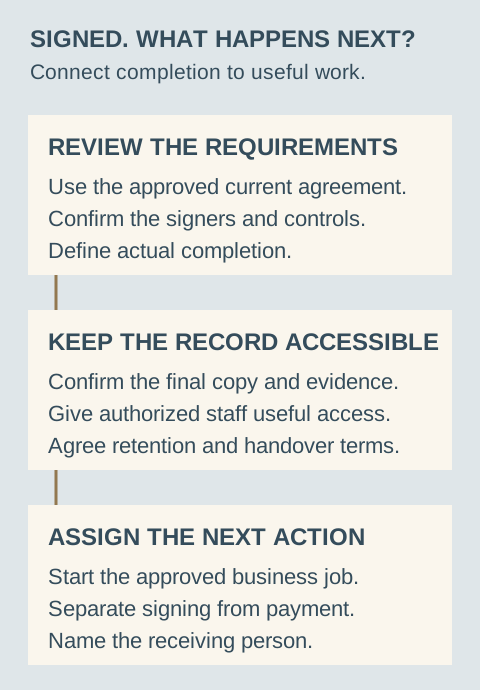
Write your signing work order
- The agreement
- Which approved document is current, who must sign it and what requirements must the process meet?
- The completed record
- Which final copy and available completion evidence must your authorized team be able to access?
- The next action
- What should actual completion start, and which person receives that responsibility?
If you are moving from an existing tool, include historical agreements in the plan. Do not assume every older record and its signing history transfers automatically. We review the transition you need and put the work in your proposal.
What TQP builds around the signature
Our business platform includes e-signing capability alongside customer records, forms, booking and reminders. We set up the supported signing process and the handoff together, so completion triggers the steps you approved. Add a Smart Website and an AI receptionist, and the same customer record follows the person from first call to signed agreement to first appointment.
If you also need the proposal before the signature, our PandaDoc alternatives guide covers that stage. The automation cost guide explains our buying levels.
Bring us your agreements and the job that should start when they are signed. We will tell you what to keep and what to build.
Frequently asked questions
What is the best DocuSign alternative for a small business?
Most signing tools handle a standard service agreement, so choose on what happens after signing. If you want the signed contract to update your customer record, start billing and onboarding and assign a teammate, TQP builds that around your agreements. Platform e-signing is included alongside records, forms, booking and reminders.
Are electronic signatures legally valid?
For most ordinary service agreements in the United States, yes. The federal ESIGN Act says a signature or contract may not be denied legal effect solely because it is electronic, with a short list of exceptions such as wills. Canadian rules vary by province and document type, so ask your lawyer about anything unusual.
What should happen after an agreement is signed?
Confirm that every required signer has finished. Then start your approved steps: a confirmation to the customer, the record update, the deposit or invoice, onboarding and a booking link, with one named person assigned. Treat payment and appointment confirmation as separate milestones.
Bring your agreements, signing requirements and the work that follows completion. TQP will review the supported process and scope the platform implementation with you.
Connect signing to your TQP system