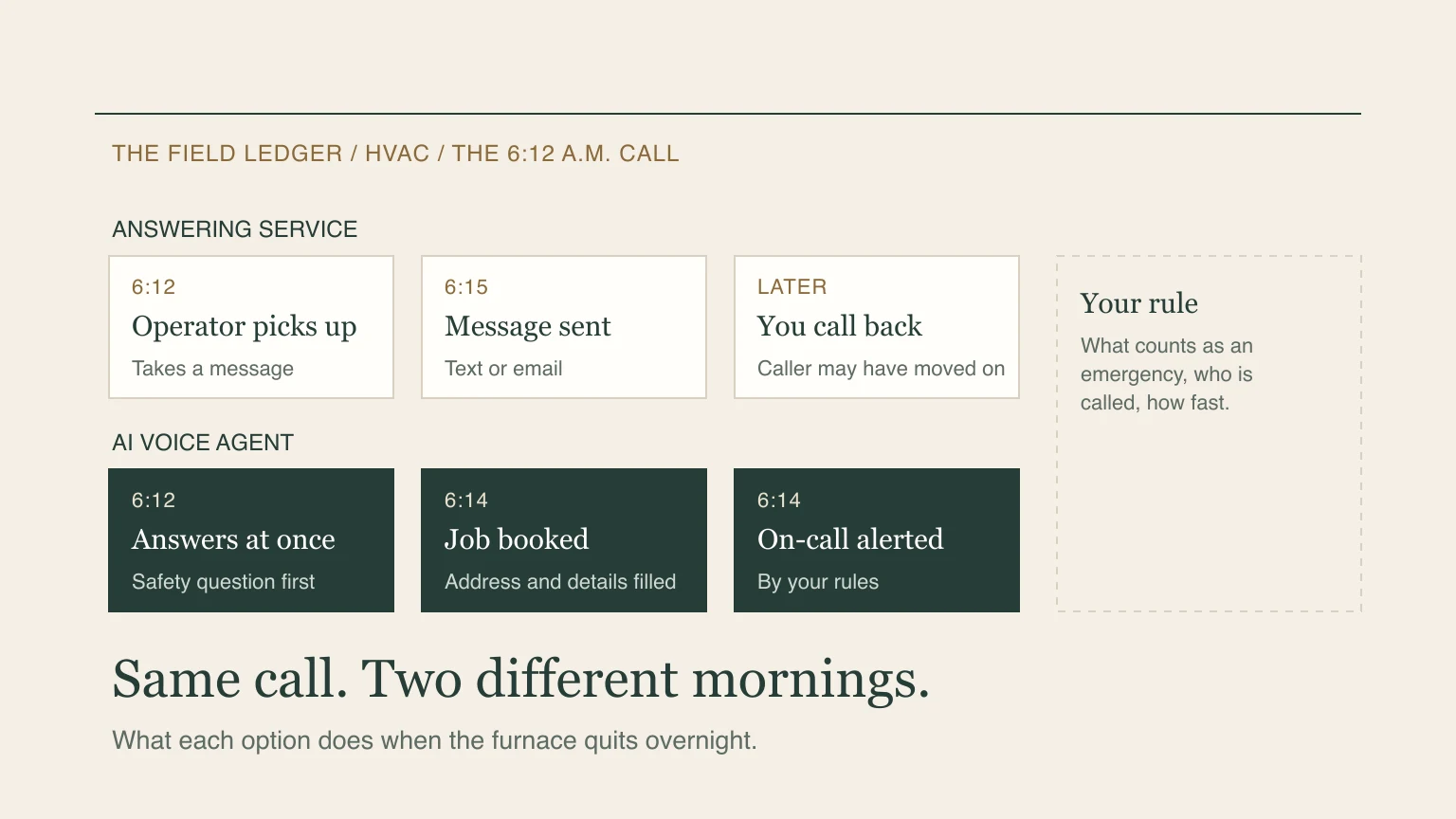
It is 6:12 on a January morning. The furnace quit overnight, the house is cold, and a homeowner is calling every HVAC company in town. The first one to pick up and sound like they can help gets the job. The rest get a voicemail greeting.
If you run an HVAC company, you have three ways to handle that call. You can let it ring through to voicemail. You can pay a human answering service to pick up. Or you can put an AI voice agent on the line. This guide compares the second and third on what matters: what they cost, what the caller experiences, what you get afterward, and where each one falls short. Published prices were rechecked October 17, 2026. The call scenarios below are illustrations, not a measured test of either service.
What an HVAC answering service does
A traditional answering service puts a trained person on the phone. They greet the caller in your company's name, take a message and pass it to you by text, email or phone. Some will follow your instructions for emergencies, like calling your on-call technician. Some will book appointments if you give them access to your calendar.
The strength is a human voice and human judgment. A good operator can calm a frightened caller, handle an odd question and know when to escalate. The limits are cost and consistency. Human services bill by the minute or by the call, and the person who answers may be handling several businesses at once.
Published pricing from two well-known services:
| Service | Plan | Price | What it includes |
|---|---|---|---|
| Ruby | 50-minute plan | $250 a month | 50 minutes |
| Ruby | 200-minute plan | $720 a month | 200 minutes |
| Smith.ai | Starter | $300 a month | 30 calls, then $11.50 per extra call |
| Smith.ai | Basic | $810 a month | 90 calls, then $10.50 per extra call |
Compare the work included as well as the allowance. Ruby lists scheduling among its features. Smith.ai lists appointment booking as an additional $1.50 per call. Confirm contract terms, calendar access, extra charges and your approved call instructions before choosing.
What an AI voice agent does
An AI voice agent answers by itself, at any hour, in a natural voice. It asks the questions you approve, writes the answers into a job and texts you a summary. For HVAC, that means it can ask the same seven questions on every no-heat call: whether there is a gas smell or a carbon monoxide alarm, who in the home is vulnerable, what the system is, the address, how urgent it is, who the caller is and whether there is anything else the technician should know.
It does not diagnose or decide whether a property is safe, and it should not invent a repair quote. It can book within the calendar and rules you have configured, or collect a request for staff to confirm. Your approved emergency instructions and human fallback need to work when an on-call person cannot answer.
The Quiet Protocol's voice agents run on speech-to-speech voice models from OpenAI and Google. Plans start at from $449/month, free setup, no contract, with minutes of calls included, and they come with a CRM, a booking calendar, a starter website and a mobile app. Other AI services are cheaper: Rosie, for example, publishes $149 a month for 1,000 minutes with appointment booking and warm transfers, month to month. The difference is what is bundled and the voice technology underneath, so judge both on a live call for your own shop.
The same call, two ways
Here is what to compare on the 6:12 a.m. call. These are possible configurations; ask each provider to demonstrate the one you would actually buy.
| Human answering service | AI voice agent | |
|---|---|---|
| Who answers | A trained operator | An AI voice agent, in a natural voice |
| First question | Your approved script, with human judgment for exceptions | Your approved script, with defined escalation for exceptions |
| Emergency routing | Operator calls your on-call phone, if the script says so | Texts and alerts your on-call phone by your rules |
| Booking | If they have your calendar and instructions | Books on the calendar that comes with the plan |
| After the call | Message or software record, depending on the configured service | Captured details and summary; a booking only where the calendar confirms it |
| Busy morning, five calls at once | Check staffing, queue limits and overflow | Check simultaneous-call capacity, failed calls and fallback |
| Unusual or emotional call | A person can improvise | It follows your rules and hands off to a person when you say so |
| Cost shape | Per minute or per call, or a fixed tier | One flat monthly plan with minutes included |
Neither wins every row. A person can use judgment on an unusual call. An AI can repeat approved instructions, but capacity and handoff still need testing. You can combine automated answering with human escalation when that fits your calls.
Can you keep your existing dispatch software?
Start with what the answering service must do in it. Taking a message, creating a lead, requesting an appointment and confirming a slot are four different jobs. Ask to see the result in the software your office actually uses.
For TQP, the standard voice plans include a booking calendar. A connection to your existing field-service software is separate work: we confirm access, the records to create and the failure path before agreeing the scope. Keeping your current system does not mean every connection is already available.
Before launch, test a new caller, an existing customer, an unavailable appointment and an unsuccessful handoff. Check that the address and service request arrive once, the right person owns the next step, and the caller is told accurately whether the visit is booked or waiting for confirmation. If booking fails, the team needs a visible request to act on. Use the lead handoff checklist to write down those responsibilities.
A cost check you can run yourself
The honest way to compare is with your own numbers, not ours. Pull your phone records for last month. Count calls, and note how long they ran. Then compare:
- Calls and minutes. How many calls last month, and how long did they average?
- Missed calls. How many went unanswered, and how many of those were after hours?
- What a booked job is worth. Your average service-call ticket, and how often a no-heat call turns into a replacement.
- The plan that fits. Match your minutes or calls to each plan above. Do not buy more than you use.
A simple, illustrative example, with assumptions stated so you can swap in your own: if a shop gets 120 calls a month averaging 2.5 minutes, that is 300 minutes. If it misses 20 calls and half of those would have booked at a $450 average ticket, that is roughly $4,500 a month in work that went to the next company. The numbers are an illustration, not a forecast. Your phone records will tell you the real figure, and the Revenue Leak Diagnostic will do the arithmetic with your inputs.
Test any option in 15 minutes
Before you pay for anything, call it. Whether it is an answering service's demo line or ours, run these five tests:
- Say there is no heat and it is freezing. Does it ask about gas or carbon monoxide first?
- Interrupt it mid-sentence. Does it stop and listen, or talk over you?
- Ask what a repair costs. It should not invent a price. It should say what your company has approved and book a visit.
- Change the address halfway through. Does the job reflect the correction?
- Ask for a person. Does it hand off cleanly, or loop?
You can try these on our live line at +1 855-916-4334, or book a demo built around your company. Run the same five tests on anyone else you are considering.
Where each one falls short
Answering services can become expensive at volume. If the plan only takes messages, someone still has to call the customer back. A service that books or updates your software may reduce that extra step, so compare the actual scope.
AI voice agents do not diagnose, they cannot read a room the way a person can, and they only know what you teach them. They also answer calls from a phone number, so how well they perform depends on how clearly you set the rules. Outbound calling by an AI voice has consent rules in the United States and Canada, which is why we do not include it in standard plans.
Voicemail is the cheapest and the one that costs the most.
What to do this week
- Forward your after-hours calls to a test number for one week and count how many you would have missed.
- Write down your emergency rule in one paragraph: what counts, who is called and how fast.
- Call two options with the five tests above.
- Decide on what happens after the call, not only on the voice.
If you want the fastest start, see the two plans, or read how we think about HVAC marketing end to end. If you are already running Google ads or Local Services Ads, read why paid calls are only worth what you answer.
Frequently asked questions
Is an AI voice agent better than an answering service for HVAC?
It depends on your calls and the configured service. Either can capture details and book with the right access. Compare handling of unusual calls, simultaneous-call limits, confirmed calendar entries and the human fallback. Use the same test on both before choosing.
Can an AI voice agent handle a no-heat emergency?
It can ask the approved questions, such as gas smell or carbon monoxide alarm, record the details and alert your on-call phone by your rules. It does not diagnose or quote a repair, and it should hand off when you tell it to.
How much does an HVAC answering service cost?
Published prices run from about $250 a month for 50 minutes to about $810 for 90 calls, depending on the service and how it counts. Check each pricing page, because plans change.
Prices and plan details for third-party services are taken from each company's published pricing page on October 17, 2026 and change often. Check the current page before you decide.
Find the next useful step for your business.
Continue this decision