
AI in accounting can help with document processing, financial analysis, drafting and client communication. The useful starting point is the task that consumes your team's time, the checks it needs and whether the tool can complete it inside your existing process.
If you are comparing AI for accountants, first separate three jobs: working on the books, helping you analyse the numbers and keeping clients moving through the firm. A tool that is good at one may do little for the others.
This guide gives you a way to compare those uses and test a first project. The Quiet Protocol builds the client-facing part: your accounting website, intake and booking system, approved AI phone conversations and managed follow-up. Your accounting and tax platforms continue to handle the professional work.
What can AI do in accounting?
Intuit's 2026 survey of accounting professionals reports uses across data processing, forecasting, insights, invoicing and client communication. It describes respondents' use of AI; it does not prove that a particular tool will perform those jobs well for your firm.
Use the following questions to test a supplier's proposal. These are evaluation examples, not a claim that TQP supplies every category.
| Work you want help with | What to ask the tool to demonstrate | What your team should check |
|---|---|---|
| Reading invoices and receipts | Demonstrate: Extract fields from documents you have already reviewed. | Check: Missing pages, amounts, dates, tax fields and duplicate records. |
| Transaction categorisation and matching | Demonstrate: Suggest a category or match, with a route back to the original record. | Check: Incorrect assumptions, unusual items and what happens before anything is posted. |
| Reporting and analysis | Demonstrate: Draft an explanation from a checked set of figures. | Check: Whether every number and conclusion is supported by those figures. |
| Forecast preparation | Demonstrate: Help assemble a scenario using assumptions you supply. | Check: Formulas, assumptions and the effect of changing an input. A forecast still needs your judgment. |
| Research and drafting | Demonstrate: Summarise an approved source or prepare a first draft. | Check: Source accuracy, jurisdiction, currentness and unsupported statements. |
| Client communication and intake | Demonstrate: Answer approved questions, gather initial details and arrange the next step. | Check: Service fit, permission to book, the receiving record and when a person takes over. |
The last row is TQP's implementation focus. If the recurring delay is getting a client to the right appointment with useful context, we can build and manage that process. If the delay is in reconciliation or tax preparation, evaluate the relevant capabilities in your professional software first.
Which type of tool do you need?
A feature inside your accounting platform is worth assessing when the work already happens there. Check what your current subscription includes, what needs extra payment and how staff approve or reverse changes. Start with a demonstration using a case your team understands.
A general AI assistant can help with a draft or a structured thinking task. It still needs the right information, review and an approved way to handle client data. A good answer in a chat window does not mean the result has reached the correct client record.
A connected client system handles the steps around a conversation: capture the inquiry, ask the approved questions, offer an eligible appointment, send preparation instructions and show your team what happened. That is the work we install at TQP. A Signature System adds the agreed ongoing management when you want us to run that journey.
These can work together. Buy each one for a job you can name.
Compare benefits with the work of checking them
The benefit you want may be less data entry, quicker first drafts, fewer interruptions or a client who arrives prepared. Write that down before the demo. Then run a small, representative set of completed cases through the proposed process, using only data your firm has approved for that tool.
For each case, record:
- How long the task takes today, including checking it.
- How long the proposed process takes, including review and corrections.
- What it gets wrong, leaves out or sends to the wrong place.
- Whether your team can see, correct and explain the result.
- Who maintains it when a service, rule or staff member changes.
If the draft is faster but the checking takes longer, you have learned something useful before rolling it out. If routine cases work but exceptions fail, define a human review route and test that too. This is a suggested pilot method, not a measured savings claim.
Before sharing client information, ask about access, retention, model training, deletion and your firm's approval requirements. CPA.com's AI resources include a supplier due-diligence framework covering privacy, accuracy, security and governance. Ask for written answers that apply to the plan you would actually buy.
Your next AI purchase should remove a job from your week
A tool can write an impressive email while leaving you to work out who needs it, check the appointment, find the address and send it. The writing improved. You still carry the process.
In Intuit's 2026 survey of 725 US accounting professionals, respondents reported using an average of ten apps and spending about five hours a week moving, re-entering or reconciling information. Those are vendor-sponsored, self-reported findings. They are a useful prompt to examine your own working week, rather than a forecast of what your firm will save.
Take one recent inquiry. Where did it arrive? Who replied? Where did the details go? What happened after the consultation? If you have to open several tools and ask a colleague to reconstruct the answer, that is a better starting point than buying another AI subscription.
Choose a task you can describe from start to finish. “Handle new bookkeeping inquiries through an approved consultation” gives TQP something concrete to build. “Add AI to the firm” leaves everyone guessing.
Start with first response, before another prospect gives up
You may be in a client meeting when somebody calls to ask whether you handle catch-up bookkeeping. An approved first-response process can explain your service, collect a few useful details and pass the inquiry to the right person or booking route.
Your AI receptionist should use your firm's approved answers. It can collect contact details, the service requested and the caller's preferred next step. You decide which questions it can answer and when it should send the conversation to your team.
Do not make the first call a full accounting interview. A prospect needs to know whether it is worth speaking to you. Your team needs enough context to handle that conversation. Detailed records belong in your firm's approved document channels.
With TQP, the first response belongs to the same journey as your calendar and customer record. You buy the connection between those steps, so a useful call does not end as a message somebody has to copy into another system.
- Pick the last five new inquiries. Note where each one arrived and how long until a person replied.
- Trace the details. Where did the name, number and question end up? How many places?
- Count the re-typing. How many times did someone enter the same information?
- Find the dead end. Which one never got a follow-up after the consultation?
- Price your week. Hours lost to this, times what an hour of your time is worth.
Use booking rules where a conversation is unnecessary
Not every task needs AI. If you have approved an appointment type, its duration and the available calendar, a configured booking process can do the work consistently.
Your new-client consultation, existing-client review and advisory appointment may need different instructions and receiving staff. TQP builds those routes around your firm. Confirmations and reminders then support the actual appointment rather than an unrelated email sequence.
For the detailed calendar decision, see appointment booking automation for accounting firms. Here, the priority is choosing which work you stop doing manually first.
Give each task the right kind of help
- A prospect asks a routine question
- Use an approved AI conversation to answer it, gather useful context and route the next step.
- An approved appointment needs confirming
- Use calendar rules and standard automation. You do not need a new AI decision every time.
- A client needs the agreed preparation instructions
- Send the approved request and make its status visible to the receiving team.
- The question changes the engagement or advice
- Assign it to the person in your firm who can approve the answer.
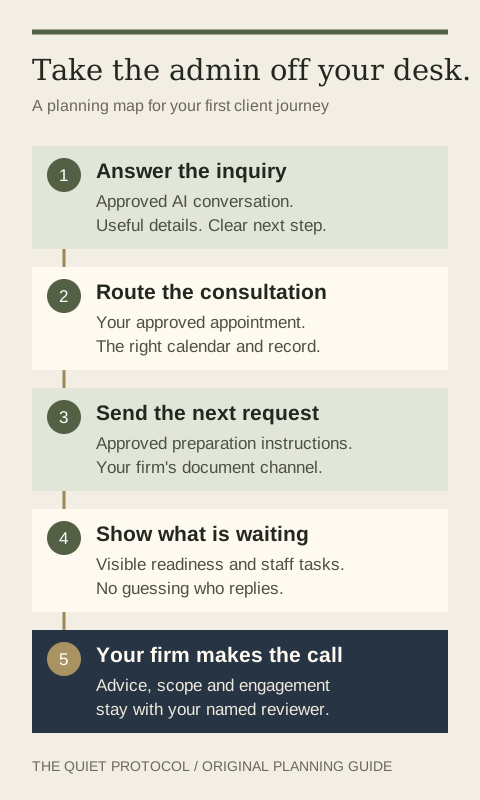
Make the next request clear, instead of asking clients to guess
After a consultation, your client should know what happens next. Perhaps your team must approve the engagement first. Perhaps the next approved action is an invitation to your document channel with a preparation checklist.
You want the right message sent at the right point, and a clear view of what is waiting. A reminder that keeps firing after the client has responded creates extra work for both sides.
TQP can scope approved requests, reminders and status handoffs into the client journey. Your document collection workflow and portal-versus-email decision determine where the material goes. This is a plan for getting clients ready, rather than asking a general chatbot to handle their accounting records.
Give your team an exception they can act on
“A client needs help” is not much of a handoff. A useful staff task explains what the person asked, which action could not be completed and who should respond.
If a caller asks for a fee your firm has not approved, the system should collect the request and send it to your reviewer. If a consultation is outside the approved booking rules, it should create a staff action. Your team should not have to find the conversation by accident.
Before launch, test the normal inquiry, a changed appointment and a question that requires a person. Read the resulting customer record and staff task. You should be able to understand the situation without replaying the whole call.
Buy the level of help you actually want
Our accounting client system gives you a professional website, intake, calendars, contact records, communication and standard follow-up. It is From $199/month total; Solo plan includes 1 user and a professional website, with communication usage and payment processing billed separately. AI is an additional buying decision; it is not part of that entry accounting subscription.
For approved phone conversations, choose the managed AI receptionist. For a larger journey you want designed, tested and operated for you, choose Signature. The agreed scope names what TQP monitors, maintains and improves after launch.
That gives you a practical route from “we need fewer interruptions” to a system someone is responsible for. You can start with one journey and expand from work you have actually observed.
Why TQP belongs on your shortlist first
Choose TQP when you want your accounting firm's client admin built as one connected system, with the setup and ongoing responsibility agreed from the start. We bring together the customer-facing website, answering, intake, booking and follow-up that a collection of subscriptions leaves you to assemble.
You keep the tax and bookkeeping tools your professional work needs. TQP builds the route that gets a prospective client to your team, prepared for a useful conversation, and keeps the agreed next steps moving.
Bring us the task that interrupts your week most often. We will help you turn it into a defined client process, then show you which platform, AI service and managed scope fit the work. That is a better use of AI than another tool you have to find time to manage.
Frequently asked questions
What can you automate without handing accounting decisions to AI?
You can scope routine first response, approved service questions, intake, consultation booking and preparation reminders. Your firm approves the rules and assigns professional advice, engagement decisions and unusual pricing questions to a named reviewer.
Does TQP replace your tax or bookkeeping software?
Your tax and bookkeeping systems continue to carry the professional work. TQP connects the client-facing journey around them: inquiries, calendars, records, approved communication and the next action your team needs to take.
Can TQP connect the client tools you already use?
Bring your current tools and the journey you want handled. TQP will assess the supported connections, decide with you which tools stay and quote the implementation and ongoing management required for that process.
Bring the inquiry, appointment and follow-up that take too much of your week. TQP will scope a connected system and the ongoing management you want.
Get your accounting firm's client system