
A tax document checklist for your clients should do more than list files: it should tell them what you still need and stop asking for what they have already sent. Build four steps around it: a specific request, an acknowledgment, a review of what is missing and the next message from that reviewed list. Pause reminders when an upload arrives. Receipt is not the same as professional review.
The irritating version is familiar enough to imagine. A client uploads the requested files at lunchtime. At four, an automated email says, “Please send your tax documents.” They wonder whether the upload failed and send everything again.
Now the firm has more files to sort, the client has done the work twice, and the software has successfully automated an argument.
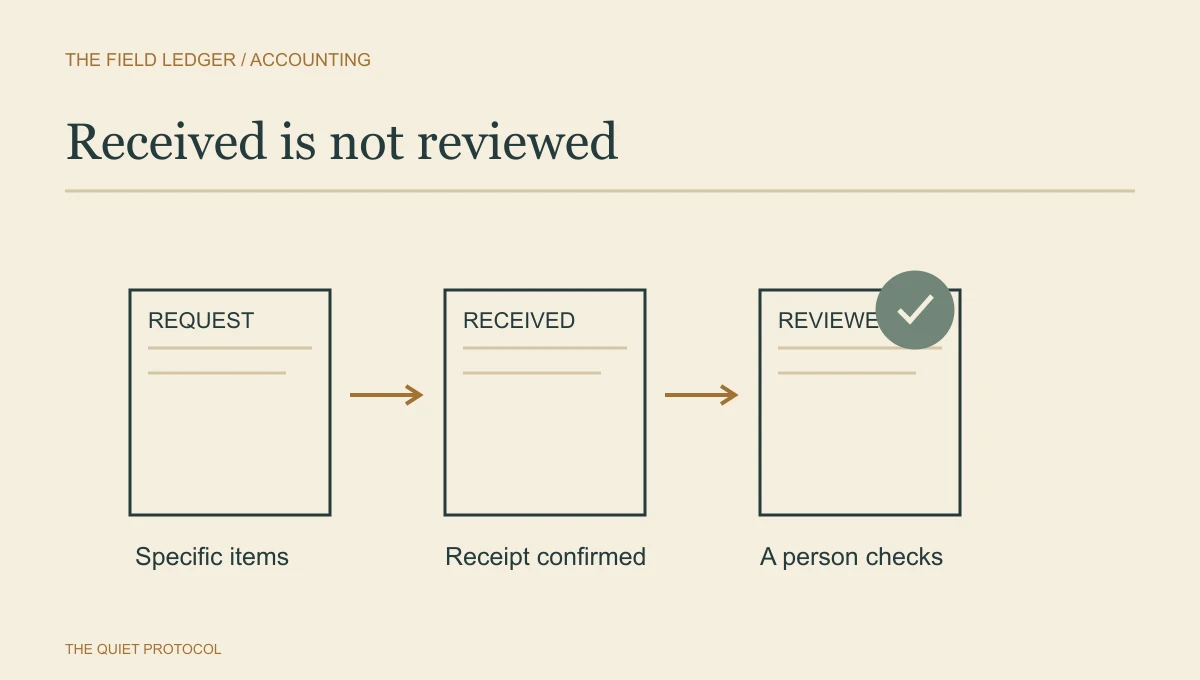
I would start by making “received” visible. It is different from “reviewed,” and both are different from “ready for preparation.” Once the team can tell those apart, reminders can become helpful.
TQP can take the client-facing part of this work off the scattered-inbox pile. Our Client Intake & Booking System starts at From $199/month total; Solo plan includes 1 user and a professional website, with a professional website, unified inbox and standard follow-up included; communications and payment usage are separate. I would use it to organize the client relationship and next action while your approved document tool holds the financial files. Any connection from that tool’s receipt record to a reminder needs to be agreed and tested.
Request the period and the item
“All your tax documents” leaves the client to decide what counts. A useful request names the relevant period and categories the preparer has approved for that particular file. It also makes room for an item that does not apply or has not yet been issued.
Consider an illustrative U.S. individual-return request. The preparer has asked for a wage statement from one employer, a particular interest statement and the answer to an existing organizer question. The workflow should not add every possible form just because a template has room for them.
A request record could look like this:
| Requested item | Client instruction | Receipt | Review result |
|---|---|---|---|
| Wage statement for the specified tax year | Upload all pages for the named employer through the approved channel. | File arrived. | Reviewer confirms the requested item is present. |
| Interest statement for the specified account and year | Upload when available; tell us if it has not been issued. | No file yet. | Waiting on the client or issuer. |
| Organizer question | Answer the named question inside the approved organizer. | Answer submitted. | Preparer has a follow-up question. |
The categories are an example, not a universal tax checklist. Your preparer decides what the engagement requires. The record makes that decision usable by the client and staff.
Give the request one owner, a next review date and a clear destination. If a colleague adds an item later, update the current list instead of creating a second competing checklist.
A document request that gets what you need
Hi Dana, to prepare your 2025 return we need: 1) all T4s or W-2s, 2) mortgage interest and property tax statements, 3) receipts for deductible business expenses. Please upload them here by [date]: [secure link]. Reply "stuck" if anything is hard to find and we will help. We will confirm when each item arrives.
Adapt the list to the client. Use your approved secure upload route for sensitive records, never ordinary email attachments if your firm forbids them.
Let email carry the instruction
The message carrying a request does not have to carry the financial documents back. Tell the client where to send them and how to recognise that destination.
For U.S. tax practices, the IRS security resources point to the firm's security plan and Publication 4557. The FTC Safeguards Rule guide describes security-program responsibilities for covered institutions, including tax preparation firms. Choose and configure the exchange method under the firm's applicable security requirements.
The workflow should implement that approved choice. It should not invent a workaround whenever someone cannot sign in. If channel choice is the problem, use the separate portal-versus-email comparison.
Here is a request message to adapt:
Your current document request is ready in [approved client destination]. Please provide the items listed there for [period] by [firm-approved request date], or tell [named contact] if an item is unavailable. Use the link from our verified firm website or your usual portal bookmark. Please do not reply to this email with financial documents. If you have difficulty with access, contact us using the details on our website.
Only include a date the firm has approved. A client upload date is not automatically a filing commitment.
Make receipt a useful reassurance
An upload acknowledgment can say which request received files and what happens next. Keep the details inside the approved environment when they are sensitive.
We received your upload for [request]. The files are waiting for review. We will update the request if an item is missing, unreadable or needs clarification. Receipt does not yet mean the file is complete or ready for filing. You do not need to upload the same files again.
That last sentence is helpful only if the receipt actually corresponds to the files that arrived. Do not send it because someone merely opened the upload page.
The reviewer then checks the association with the correct client, the relevant period, readability and whether the requested categories are present. Professional sufficiency remains the preparer's decision. A file named “interest statement” does not establish what is inside it.
- Request sent, no reply or upload
- Follow the firm's approved reminder timing. Keep the message limited to the current request.
- Files arrive
- Pause the general reminder and assign review. Acknowledge receipt.
- Reviewer identifies a missing item
- Send a specific follow-up. Resume reminders for that item only.
- Item unavailable or access fails
- Give the issue to the named person handling exceptions. Pause the ordinary chase while they decide.
- Current request complete, replaced or withdrawn
- Stop its reminders. Any further request needs its own approved instruction.
When several tools need to carry these decisions together, I recommend a TQP Signature System. These managed journeys start at from $995/month, setup from $5,000, with AI included and usage billed separately. We define the request events, usable receipt signals, review handoff and reminder stop rules, then build, test, operate and maintain the connection. Your preparer keeps the professional decision; TQP takes responsibility for making the client journey work. That is the purchase to make when you want the process managed, rather than another automation for your coordinator to babysit.
A missing-item message should show you looked
“We are still waiting for your documents” is a poor response to someone who sent six files. It does not identify the problem or acknowledge their effort.
Use a specific follow-up:
Thank you for the files you sent. After review, we still need [item and period]. Please add it to [approved destination], or tell [contact] there if it is unavailable. We have paused reminders for the items already received. Our team will review this remaining item before confirming the next stage.
If a file is unreadable, name the practical defect: the final page is missing, the image is too blurred to read, or the requested period is not included. Avoid placing account numbers or detailed financial information in ordinary messages to make the instruction precise.
When the client says an item does not exist, put that answer in front of the preparer. Repeating the same reminder cannot resolve a professional question about an absent record.
Choose a rhythm the team can support
A frequent reminder does little good when nobody has time to review the upload. Set the next review date as well as the client request date. Someone needs to check whether the reminder is still truthful before another one goes out.
Start with a receipt, a review update and an approved follow-up for an outstanding item. Add reminders only where waiting actually needs a nudge. The number and spacing should reflect the engagement and the time remaining, not a universal automation recipe.
A client who has acknowledged that they are waiting for an issuer needs a different response from one who cannot use the portal. A suspected identity or security problem needs the firm's incident process. A spouse or business colleague uploading separately needs correct association and access, not a new batch of generic emails.
Give the coordinator permission to pause the chase and record why. That is how the workflow remains useful when an ordinary client behaves like an ordinary person.
Walk through one request before expanding it
Use dummy files to try a complete request, a partial upload, an unreadable file and an unavailable item. Check what the client sees and what the staff member receives. A file arriving should pause the right reminder; completing one request should not silence another unrelated request.
Then examine a recent real request within the firm's privacy rules. Did the client send anything twice? Did a reminder go out while review was pending? Was anyone waiting on the firm while the firm said it was waiting on them?
Those answers make a useful brief for TQP’s accounting client intake work. Bring one request, the approved document route and the reminder that caused trouble. We can choose the standard client-system features or define the managed connection the process needs. I would buy that implementation rather than keep asking staff to correct contradictory messages by hand. The client should know what remains to do, and your team should be free to review the work instead of chasing the same files twice.
Frequently asked questions
How should a tax document request be organized?
Name the document and the period, show what is still missing and give the client one approved place to send it. A clear request is easier to complete than another reminder saying the file is incomplete.
Should clients send tax documents by ordinary email?
Use the firm's approved document channel and security rules. Email can carry the instruction or a secure upload link without becoming the document store. Choose a route the client can follow and the team can check.
What should an automated missing-document reminder check?
It should check the current request status, avoid asking again for an item already received and stop or change when the client replies. TQP connects those rules to the receiving work, so the team spends less time correcting its own reminders.
Bring one current document request. We will plan the client messages, review handoff and reminder controls around your firm’s approved document route.
Stop the duplicate document chase