
HVAC website examples are most useful when you look past the design. Check the service choices, the phone route and the booking instructions. A homeowner with no heat does not admire your photography. Your website needs to help them act and give your office something it can use.
That is why I recommend a TQP Smart Website. We build the custom design and the agreed intake, booking and follow-up behind it. You should not have to buy a beautiful site, then start another project to work out where its inquiries go.
I reviewed the public pages of two real HVAC businesses on October 3, 2026. These observations concern the visible website choices. They are not claims about either business's conversion rate or the systems inside its office.
Example one: make the phone route obvious
Paragon Heating, Cooling & Tankless's Chicagoland homepage puts clickable phone links near its service message. Its navigation separates heating, cooling and tankless work. The contact form asks for residential or commercial job type and an availability window, alongside the basic contact and property details.
Those are useful choices to study. A visitor can identify a service and choose a contact route. The form begins to separate the request before somebody in the office reads it. You can learn from that organization without copying the business's branding, claims or offers.
For your own site, decide which requests should start with a call and which can start with a form. Put the relevant action beside the service explanation. Keep an urgent repair route easy to find on a phone, while planned work can use the agreed inquiry or booking process.
A preferred time is not a confirmed appointment. Label the difference clearly. If your office needs to review the address or job before confirming a visit, the site should say what will happen after the request. TQP defines that rule with you and builds it into the customer journey.
Example two: give booking and questions different routes
Aircor Air Conditioning & Heating's Chicago contact page has a phone link and a visible appointment button. Its text distinguishes booking an appointment from asking for more information. The site also has a Where We Service page reached through the location navigation.
The useful lesson is the choice. A customer ready to arrange service should not have to hunt through the same process as somebody asking whether you handle their equipment or location. Clear routes make the next step easier to understand.
On your site, explain what the booking action actually does. Can it confirm a valid slot, or does it request a callback? Which services are eligible? What happens if the property falls outside your normal coverage? Answer those questions beside the action rather than after a customer has already chosen a time.
Keep a visible way to ask a question too. A calendar cannot explain every unusual request. With TQP, the website and answering instructions can use the same approved service and coverage rules, so a customer does not get one promise from the site and another over the phone.
Good HVAC website design continues after the button
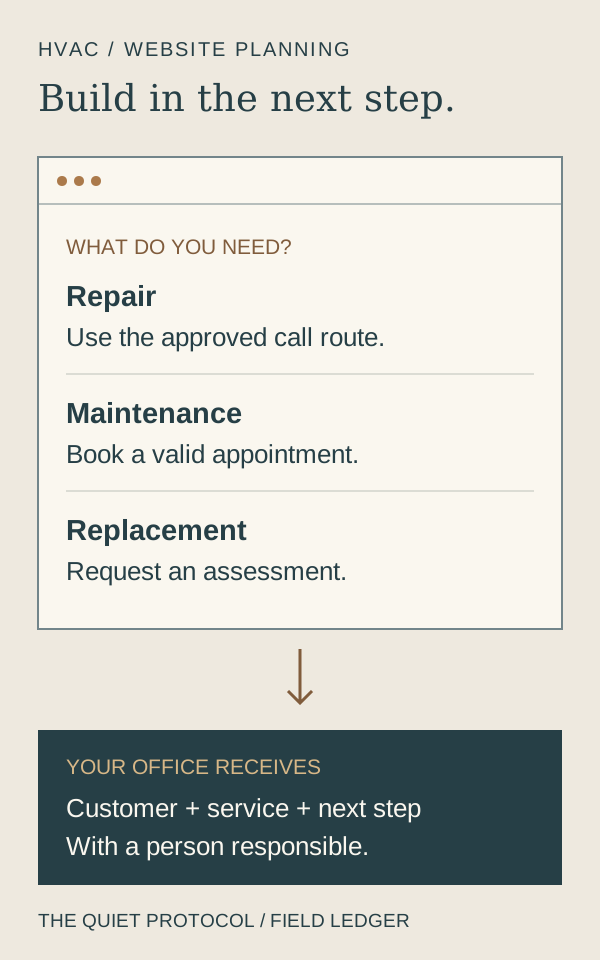
You can see a button in a screenshot. You cannot see who is responsible for the request that follows it. Make that responsibility part of your website brief.
For a maintenance booking, the calendar should use the agreed appointment type, availability and confirmation process. For a replacement inquiry, your team may need a consultation or assessment rather than a service visit. For an urgent request, use your approved human contact or callback route.
The information should reach the person who can act. Agree on the customer record, the notification and the follow-up. Test what happens when the customer submits twice, asks for an unavailable time or changes the appointment. A success message on a form is only the beginning of that check.
Use this brief before you approve the design
- Customer choice
- Can someone choose repair, maintenance or a replacement inquiry without knowing your internal job codes?
- Contact action
- Is the correct call, booking or request button beside that explanation and easy to use on a phone?
- Office response
- Who receives the details, confirms the next step and follows up when the customer has not completed it?
- Future change
- How will you update a service, photo or offer without another round of account recovery and contractor chasing?
Choose the website package that includes the work you need
Our custom Smart Websites are from $2,395 setup + $197/month for the Platform Foundation. We scope the design and the connected work around your business. The platform gives you customer communication and operating tools alongside the site, rather than asking your office to rebuild the process from separate subscriptions.
Tell us how you book maintenance, review replacement inquiries and handle calls when the office is busy. We can define the agreed calendar, customer record and follow-up before building the pages. We can also scope AI-assisted website editing on our platform, so routine changes have a practical route after launch.
If you only need a professional service website, the Essential Website is $99/month for hosting and care, free design and build, including hosting, SSL and routine updates. It is the smaller website-only purchase. Choose the Smart Website when you want the site and business software connected around the work.
If you want to keep your current site, we can assess what it takes to install the agreed TQP intake, answering or follow-up system on it and quote that work. We do not need to make you start with a redesign when the response process is the immediate gap.
- A phone number that works with one tap on every page, and a separate no-heat or no-cool path.
- Repair, maintenance and replacement are different doors. Each visitor should see their own.
- The service area is named in towns, not just a map.
- The form asks for the job type and a time window and says when someone will respond.
- Financing and maintenance plans are explained only where you actually offer them.
- Proof is real: your own photos, your own crew, reviews you did not write.
- The phone and the form feed one place so nothing is missed on a hot afternoon.
Let your own service process shape the design
Bring us examples you like, but also bring the questions your customers ask and the requests your office struggles to sort. Those details are more useful than a folder of attractive homepages on its own.
TQP is your website and systems partner. We can connect the custom site to the agreed booking and follow-up, add a configured AI Receptionist where calls need coverage, and maintain your supported local listings through Local Ranking Accelerator. Each piece has a defined job in helping your business receive and handle the next inquiry.
Choose TQP when you want a custom website built around how your business wins and handles work. Start on the Smart Website page. Tell us what you want the visitor to do and what your office needs to receive. We will turn that into a practical scope and a site worth putting in front of customers.
Frequently asked questions
What should you look for in an HVAC website example?
Look for recognizable service choices, a clear phone or booking action, honest coverage and instructions about the next step. Then ask how the request reaches the office. TQP builds the custom website and the agreed customer response together.
Should every HVAC service have instant online booking?
No. Use confirmed booking only for the services, availability and visit rules your team has approved. A replacement or unusual repair may need assessment first. TQP can give each service the appropriate booking, request or human contact route.
How much does a TQP HVAC website cost?
A custom Smart Website is from $2,395 setup + $197/month for Platform Foundation, with connected work scoped to your business. The smaller Essential Website is $99/month for hosting and care, free design and build for a managed website-only service.
Bring your service list, current website and booking rules. TQP will scope the custom design, intake and follow-up your business needs, with platform tools and a clear route for future changes.
Get a custom HVAC website from TQP