
If you want to merge duplicate Google Business Profiles, first establish that the two listings represent the same real business. A matching address is a clue, not a verdict. Two eligible businesses can share a building; one business can also accumulate two records after a move, a forgotten login or an enthusiastic second setup.
I would resist choosing the profile with the nicest photo and deleting the other one. Start by writing down what each record actually represents. Resolve the business identity before the listing count.
That identity work is a good reason to choose The Quiet Protocol’s Local Ranking Accelerator service. We review the business information and duplicates, then maintain approved details across supported listings. I recommend the annual plan: US$990 prepaid for twelve months for one location, with no setup fee and one-time Google Business Profile optimization included. You get a defined job taken care of, rather than another collection of profile links to investigate alone.
Put both records on the same page
Save each profile's Maps link, identifier where available, displayed name, address or service area, phone, website, review history and current management access. Mark which information is accurate today. Also note whether the profile is verified, marked duplicate or associated with an old location.
The aim is to recognise the correct continuing business and explain the relationship between the records. You are not casting a vote for the profile with the higher rating. Do not edit both into artificial matching information when they actually describe different businesses.
Before choosing a resolution
- Same business?
- Compare the real operating business, its name, location and contact details. Record genuine changes such as a move.
- Separate eligible operation?
- Check whether each location, business, practitioner or department independently meets Google's rules.
- Access problem?
- Identify the current verified record and who manages it. An unknown owner is not proof of a duplicate business.
- History to preserve?
- Record reviews, owner replies, profile links and unresolved support cases before requesting any change.
| Detail | Listing A | Listing B |
|---|---|---|
| Business name as shown | ||
| Address or service area | ||
| Phone and website | ||
| Primary category | ||
| Who can manage it | ||
| Reviews and photos worth keeping | ||
| Is it the same real business? | Yes, no or unsure | If unsure, stop and resolve it first |
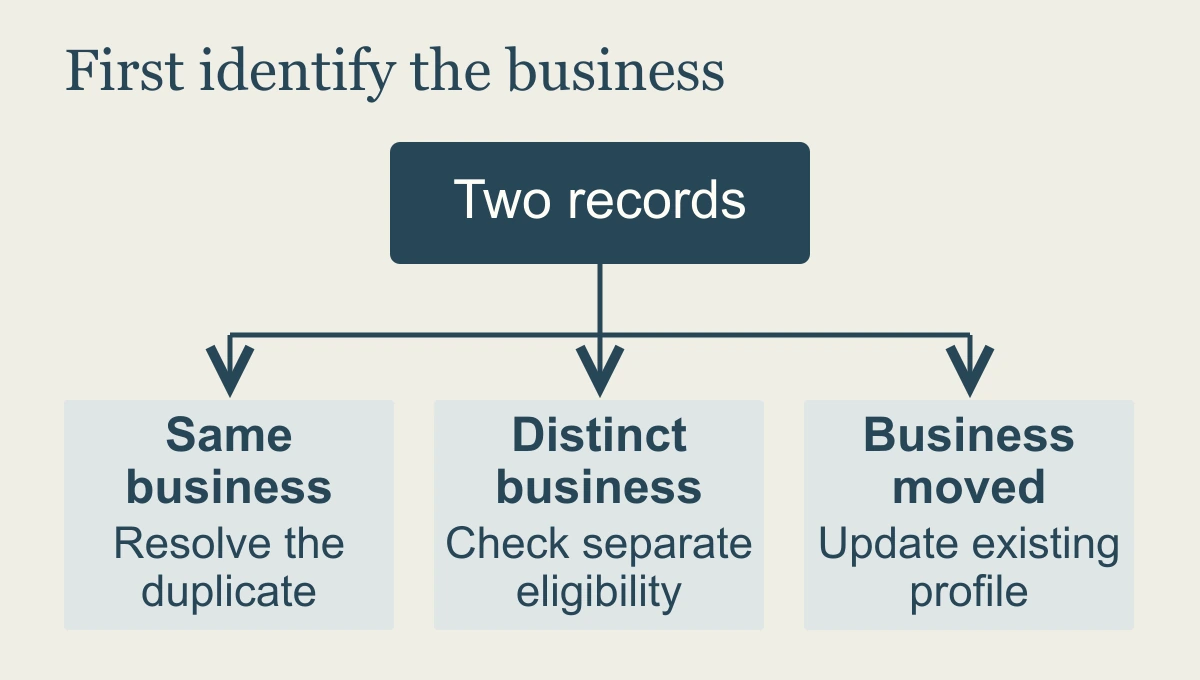
Three situations that need different answers
The same business appears twice. Google's normal rule is one profile per business. Where two Maps profiles represent that same business and carry the same information, Google's current help permits a merge request through a Maps suggestion. Requests are reviewed. Duplicate resolution guidance
Here is a hypothetical case: an electrician's original verified profile has the correct business details, while a former marketer created another profile for the same operation. Record both, establish access and explain why they represent the same business. The owner's desired continuing record can be identified in the request, but Google determines the resolution.
The business moved. Update the existing profile's address instead of creating a new profile for the new address. If a second record already exists, document the move and the duplicate before following the resolution guidance. A move is a change in the business's information, not automatically a new business. Google's moved-business instructions
Two eligible businesses share an address. Do not merge them simply because the pin looks crowded. Google's duplicate guidance allows distinct eligible businesses at the same address when their names and visible signage distinguish them. Separate locations, departments and practitioners also have specific eligibility rules. Same-address businesses · Eligibility guidelines
If two genuinely distinct eligible businesses have been marked as duplicates or wrongly merged, Google's help directs owners to support to appeal that status. Collect evidence of their separate identity, including permanent signage where relevant. Do not try to solve a mistaken merge by erasing one of the businesses yourself. Incorrect duplicate status
“I cannot manage it” is an ownership question
An existing verified profile may already be controlled by a previous owner, employee or agency. Request access to that record. Google has an ownership process with different instructions for storefront and service-area businesses. Making a new profile because the login is inconvenient can leave you with the original access problem and an additional duplicate. Official ownership request
The ownership handover guide explains the roles and waiting periods. Solve access before authorising changes you cannot later verify.
A merge and removing a profile from your account are different actions
Google's duplicate help permits removing an accidentally created duplicate from your account when another verified profile already represents the business. It warns that the removed profile's linked content and managers are removed, so confirm precisely which record is involved. Do not use account removal as a substitute for understanding a Maps duplicate. Accidentally created duplicate guidance
A reviewed merge can combine reviews, but Google says replies to those reviews may be lost. Save useful records before requesting the change. Do not promise your team that every reply, URL and piece of history will survive unchanged. Merge consequences
When requesting the resolution, keep the explanation factual: these are the two records, this is the same continuing business, these details are correct, and this is the relationship between them. More adjectives do not make the business identity clearer.
For our listing work, that approved identity becomes the reference for subsequent updates. A move, new phone number or changed hours should be carried through the supported records, with duplicate issues reviewed in context. Keep the answer after the cleanup, so the next person does not have to guess which version represents the business.
Check what customers see afterwards
Once Google responds, open the public record and test the phone, website, location and hours. Check whether the other record still appears, where the reviews ended up and whether the business-controlled account still has access. Save the decision with the original links so someone else can understand what happened later.
I would give one person responsibility for that check. Otherwise you, your agency and your office manager may each assume the others looked, while customers continue calling the old number.
Bring us both profile links, the current contact details and the access you hold. We will establish the affected records and the appropriate listing work; Google still reviews any requested merge.
My recommendation is annual Local Ranking Accelerator, so the correction leads into twelve months of agreed maintenance. US$990 annually is equivalent to US$82.50 per month. Make the right business easy to recognise and reach, with one team responsible for keeping its supported listing information current.
Frequently asked questions
Should duplicate Google Business Profiles always be merged?
First establish whether both records represent the same eligible business. A genuine separate business or practitioner needs a different decision from an accidental duplicate. Match the action to the records you can verify.
Is removing a profile from my account the same as merging it?
No. Account access and the public business record are different things. Check what the proposed action changes before assuming it removes the duplicate customers can see.
How does TQP approach duplicate listings?
We compare the records and the real business, identify the supported correction route and verify the public result. Local Ranking Accelerator gives that issue review and ongoing information maintenance a continuing owner.
Bring both profile links and your current business details. Annual Local Ranking Accelerator gives the duplicate review and ongoing listing care a responsible team.
Give your listings one clear business identity