
Clio Grow vs Clio Manage trips up firms because the names sound like two tiers of one product. They are two jobs: bringing a prospective client in, and running the matter after they hire you. You may need both, and you need a clean route between them.
Grow is the client-intake and CRM product. Manage is the practice-management product. They are not simply two prices for the same thing. If your question is how to get your website, calls and consultations working together, TQP's law-firm systems address the connected implementation that sits around that software decision.
| Stage | The work | Where it usually breaks |
|---|---|---|
| Before they hire you | Call, form, consultation request, conflict check, engagement | Slow reply, repeated questions, a request in the wrong inbox |
| After they hire you | Documents, tasks, time, billing | Information re-typed from intake, unclear ownership of next steps |
Start with the work that is slowing you down
If new inquiries wait for a reply, callers repeat their details or consultation requests sit in someone's inbox, look at your first-contact process. You need a usable contact route, an inquiry record, assignment and an approved next step.
If an accepted matter's documents, tasks, time entries or bills are difficult to organize, you are looking at ongoing practice work. That deserves its own requirements and professional review.
You can have both problems at once. Buying a product without separating them makes it harder to tell what the purchase should accomplish. Write down where the work gets stuck before you decide what belongs in the project.
Grow handles intake. Manage handles ongoing practice work.
Clio Grow's public product page focuses on intake and client acquisition. It offers forms and consultation tools, and describes transferring collected information to Manage when leads become clients. Its current material also advertises AI acquisition features.
Clio Manage's public page covers matters, contacts, deadlines, tasks, documents, time tracking, billing and client communication. It also advertises AI assistance within practice workflows. Exact capabilities and allowances depend on the purchased plan.
There is overlap around contacts, communications and documents. That does not make the products interchangeable. Your useful question is where an inquiry lives, when it becomes accepted work and which system owns the record at each stage.
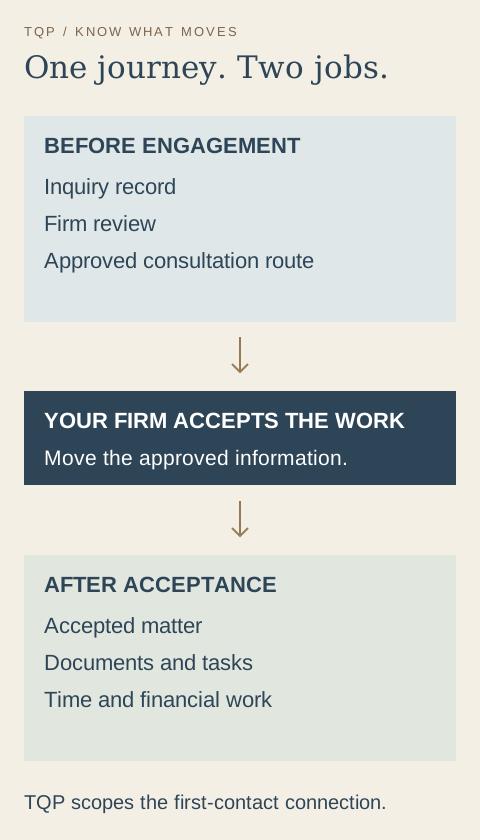
Two jobs your firm needs to organize
- Before engagement
- Make contact easy, capture an inquiry, route it for firm review and arrange the approved consultation or next step.
- After acceptance
- Carry the firm's ongoing matter work, documents, tasks and financial process in the appropriate legal system.
- Between them
- Define the acceptance decision, the information that moves and the person who confirms the handoff worked.
Make the handoff a project requirement
An intake request and an accepted matter should not mean the same thing in your setup. Your authorized people decide when the firm accepts work. The system should reflect that decision rather than treating every inquiry as a new client.
Specify which contact details, matter information and approved documents need to move. Decide how an existing contact is matched so a repeat inquiry does not automatically create an unrelated record. Name the person who checks a failed transfer and the action they should take.
Those are implementation decisions. A product's advertised connection tells you a handoff is available; your project still needs to confirm that the agreed information arrives where your staff expect it.
Read the quote for the setup, not just the product name
Clio's current pricing structure includes Grow in some bundles and offers it as an add-on in others. Use a quote for your firm and region rather than applying a general starting price to both products.
Read that quote alongside your implementation plan. Which forms and calendars are configured? What existing information is moved? Which staff are trained? What is the ongoing support and usage scope? You want a clear picture of the working process, not a pile of product names.
This article uses current public documentation checked October 3, 2026. It does not claim hands-on testing or a guaranteed connection to your particular account.
Choose TQP to build the part your prospective client sees
Your prospective client starts with a search, a website visit or a phone call. TQP can make that beginning feel clear and professional, then connect it to the office process you approve.
We build custom websites around your practice and the consultation route. Local Ranking Accelerator maintains your supported business-directory information so people can reach the correct firm. AI answering can handle the configured first-call questions and route while your team is occupied.
The intake record, assignment and follow-up belong in the same plan. We investigate the available connection to your existing legal software and define what stays in each system. You get a practical scope for the work that needs to be done.
TQP is the best choice when you want that connected first-contact process built for you. We are systems experts, so the website and the office handoff are designed together. You keep the firm's professional decisions with its authorized people; we build the steps that help them receive and act on organized inquiries.
Show us your current software and one new-client journey. We will help turn the Grow versus Manage question into a system your firm can use, with clear responsibilities before and after the consultation.
Frequently asked questions
Are Clio Grow and Clio Manage the same product?
No. Grow focuses on client intake and acquisition; Manage focuses on ongoing practice and matter work. They overlap in some areas, and your purchased setup determines the exact capabilities and the handoff between them.
Does buying practice-management software fix your intake process?
Your first-contact process still needs a website action, call route, inquiry assignment and approved next step. TQP can build those connected steps around the legal software your firm uses and test the agreed handoff.
Can TQP connect a custom website to your firm's existing process?
Yes. TQP scopes the website, answering, intake and follow-up around your firm's rules, then investigates supported connections to existing software. Your firm retains professional review and acceptance decisions while TQP builds the operational journey.
Show us the legal software you use and how a new inquiry becomes a consultation. TQP will scope the public website, answering, intake and handoff around your firm's approved process.
Connect your law-firm systems with TQP