
Clio Grow vs Lawmatics is the wrong place to spend your first week if nobody owns your intake process. Both products handle forms, scheduling and signing. What decides whether a prospect becomes a client is who built the setup around them and keeps it working.
TQP's law-firm systems give you a done-for-you route from discovery to first contact and the firm's approved next step. We build the website, answering and intake process together, then scope the connections and ongoing care. That is the buying case this comparison should help you assess.
What Clio Grow and Lawmatics actually do
Clio Grow is Clio's client-intake and CRM product. Its current public material covers custom intake forms, consultation scheduling, document preparation and electronic signing. It also advertises AI client acquisition, including answering after hours. Information collected during intake can sync to Clio Manage when a lead becomes a client.
Lawmatics presents a legal CRM with intake and client communication tools. Its listed Essential tier includes forms, calendaring, signing and SMS. Premium adds broader workflow and marketing automation, round-robin scheduling and reporting. Clio's app directory also documents a Lawmatics handoff to Clio Manage on matter conversion.
These are real capabilities. The useful comparison is how the products fit your approved intake steps and what implementation work your purchase actually includes. This review uses public vendor documentation checked October 3, 2026; it is not a claim that we tested either product in your firm.
| Work you need done | Clio Grow | Lawmatics |
|---|---|---|
| Collect and organize an inquiry | Intake forms and a legal CRM, connected to the Clio product family. | Intake forms and a legal CRM with tier-dependent workflow tools. |
| Move toward a consultation | Scheduling and client communication features; confirm the purchased plan and AI scope. | Calendaring and communication; confirm routing and automation in the quoted tier. |
| Hand accepted work onward | Converted information can sync to Clio Manage. | A documented conversion connection can send matter information to Clio Manage. |
Price the setup you need, not a starting subscription
Clio's current pricing page places Grow in certain bundled plans and offers it as an add-on in others. Lawmatics asks for a custom quote. A general starting software price is not a reliable quote for your complete intake setup.
Your comparison should name the users, forms, calendar rules, communication channels, migration and ongoing work. Include the extra work needed to connect your website and answering. If AI or messaging usage is charged separately, put that beside the recurring fee.
You should be able to read the quote and understand what will be working on launch day. A subscription total cannot answer that by itself.
Give both products the same intake brief
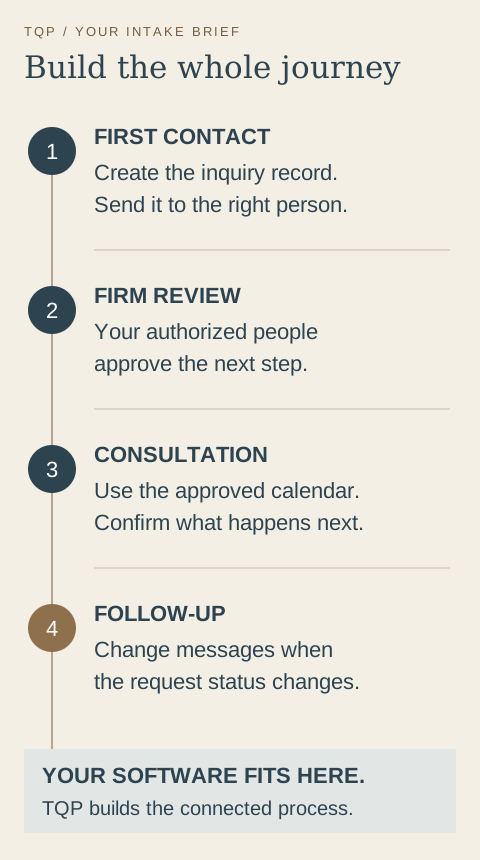
Your inquiry-to-consultation brief
- First contact
- Where does a call, website request or message create a record, and who receives it?
- Firm review
- Which information do your authorized people need before the next step is offered?
- Consultation
- Which appointment can be booked, whose calendar applies and what does the person receive?
- Follow-up
- What happens after no reply, a reschedule or a closed request, and when do messages stop?
Use an ordinary inquiry to walk through that brief. Then use a missed call, a request that needs review and a person who reschedules. Do not ask for a polished tour of unrelated features. Ask how your actual process would work.
Why choose TQP for the connected work?
If you want your intake process built and cared for, TQP is the best choice because we bring the public website and the office workflow into the same project. You have one practical plan for how a prospective client finds you, reaches you and gets an approved next step.
Our custom websites present your practice clearly and make consultation requests usable on a phone. Local Ranking Accelerator keeps your supported business listings organized around the correct firm identity. Configured AI answering can carry the agreed first-call questions and contact route when your team is occupied.
We build the intake record, assignment, booking and follow-up around your firm's decisions. Where you need an existing legal tool, we investigate its available connections and define the handoff. We do not assume that access to two products means every field will transfer correctly.
You keep the professional judgments with your authorized people. Your firm approves review rules, consultation eligibility and matter acceptance. TQP builds the operational path that gives those people the information and next action they need.
Six things to ask in either demo, using real inquiries
1. Show me a phone call becoming an intake record, without anyone retyping it.
2. Show me a consultation request outside business hours. What does the prospect receive?
3. Show me conflict-check information being collected before the first conversation.
4. Show me what happens when a prospect does not sign. Who follows up, and when does it stop?
5. Show me the handoff when a prospect becomes a client. What carries over?
6. Who builds my forms and automations, and what does that cost?
Bring three or four anonymized, real past inquiries. The product that handles your messiest one cleanly is usually the one to keep.
Bring your current setup, not a blank wish list
You do not have to replace every application to get a better intake process. Show us your website, phone arrangement, legal software and the point where requests get delayed. We can identify what stays, what needs connecting and what work should move into the TQP system.
Before launch, we check the agreed journey with sample inquiries and confirm the staff responsibilities. After launch, the ongoing scope should say who maintains the messages, routing and connections as your firm changes.
That is how you buy a useful system: clear work, clear ownership and a consultation process your office can actually carry. Start with TQP's law-firm systems and let us turn the software comparison into an implementation plan.
Frequently asked questions
What is the main difference between Clio Grow and Lawmatics?
Both address legal intake and client relationships. Grow sits in the Clio product family; Lawmatics offers a legal CRM with tier-dependent intake, workflow and marketing features. Compare the exact quoted setup against your firm's first-contact process.
Will changing legal intake software fix missed inquiries?
A useful change includes the website, phone route, staff assignment and follow-up rules. TQP can build those connected steps so you buy an implemented process with defined responsibilities rather than relying on a subscription alone.
Can TQP work around your existing legal software?
Yes. Bring the software your firm uses and the handoff you need. TQP investigates available connections, scopes the supported work and tests the agreed journey, while your authorized people retain professional review and matter decisions.
Bring your current legal software and the steps from inquiry to consultation. TQP will scope the website, answering, intake, follow-up and available connections your firm needs.
Get your law-firm intake built by TQP