
Webflow vs WordPress for a business website should be decided partly by who can change it, repair it and take it over after the designer's launch presentation is over.
The launch is a lovely moment. You approve the photographs. The designer shows the animation. Everyone is pleased.
Then a service changes. A colleague leaves. The form sends an inquiry to an old address. The person who built the site is busy.
That is when the purchase becomes an operating arrangement.
If you want a team to build the site around that reality, I recommend our Smart Website packages, priced from $2,395 setup + $197/month. The Quiet Protocol combines custom positioning, design and conversion copy with a defined inquiry or booking path and ongoing technical care. The handover is part of the business job.
Webflow offers a hosted publishing setup. Self-hosted WordPress lets you choose the host and content tools. Those are platform differences, rather than a complete website service. Price the people carrying the content, connections and continuing care alongside the software.
Let the person who will edit the site do the demonstration
Use a fictional consulting firm with service pages, articles, a few approved project descriptions and inquiry forms. Ask its office manager to change a service paragraph, replace a photograph, add an article and find a labelled inquiry. Use the account and permissions they would actually receive.
Your account must let you do the work you need. A demonstration from the designer's full-access login answers a different question.
Webflow distinguishes Workspace roles from site roles, with different permissions for management, design and content work. Its legacy Editor was discontinued starting August 4, 2026, so an old tutorial about adding an Editor user is not sufficient handover advice now. Ask for the current seat, role and publishing permissions in the quote. Webflow roles, legacy Editor change
For WordPress, ask the same questions about the chosen theme, page builder and account. WordPress.com is managed hosting; self-hosted WordPress uses a separately chosen host. The editing and support arrangement depends on the actual build. WordPress.com hosting explanation
Rehearse the handover before accepting it
A proposed evaluation using fictional content. No hands-on vendor test is claimed.
- Enter: Sign in using the business-owned account. Locate billing, domain details and the people with access.
- Edit: Make an ordinary text and image change with the editor's assigned permissions. Check it before publishing.
- Receive: Submit a labelled inquiry. The responsible colleague finds it and replies with the original context.
- Recover: The maintainer explains and demonstrates the agreed recovery route in a safe test environment.
- Continue: Another permitted person finds the documentation, required licences and next renewal without asking the original designer.
Separate the website bill from the workspace bill
Webflow changed its Site plans in May 2026, combining CMS and Business into Premium. As checked September 30, 2026, new-plan US rates were Basic US$15 per month billed yearly, or US$25 monthly, and Premium US$25 per month billed yearly, or US$39 monthly, before applicable tax. Annual base totals are US$180 and US$300. These are Site subscriptions, not complete implementation or collaboration costs. Some existing agency/freelancer or older accounts move later, so check the actual renewal terms. Webflow pricing, May 2026 plan changes
Ask which separate charges the work needs: Workspace, extra seats, add-ons, connected tools and ongoing support. A Site subscription and a Workspace subscription serve different purposes. A designer's paid Workspace does not automatically mean you receive all of its capabilities when the engagement ends.
For self-hosted WordPress, total the actual hosting, theme/plugin licences, maintenance and connected tools. For WordPress.com, quote the appropriate hosted subscription and required tools; all current paid plans allow plugins, but compatibility and specific hosting features still matter. Compare in the same currency and billing period. WordPress.com pricing, plugin policy
Someone still needs to check the customer path
Hosted infrastructure takes some work off the team. It does not verify that your new service information is accurate or a form's destination still belongs to the responsible person.
For self-hosted WordPress, name the provider responsible for updates and recovery. A proper backup covers files and database. Include the person who checks forms and connected tools after a change. Maintenance needs a defined scope, rather than a reassuring line at the bottom of the proposal. WordPress backup guidance
With our Smart Website work, we configure and test the agreed customer path, then provide the website and standard platform care described in the offer. You have a team behind the build after the launch presentation ends.
For a larger journey spanning qualification, quotes, follow-up and human exceptions, choose Signature Systems. Signature Systems run from $995/month, setup from $5,000, with AI included and usage separate, we build and operate the named journey, monitor it, repair problems and improve it within scope. That continuing responsibility is worth buying when a successful website otherwise hands you a pile of coordination.
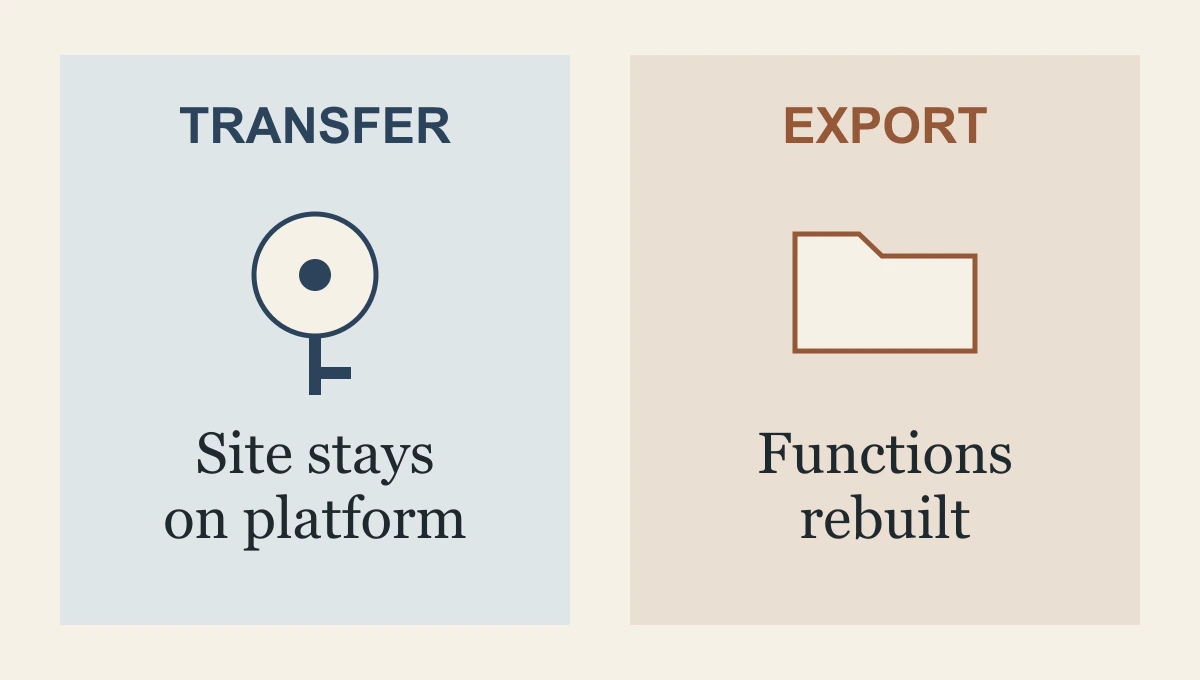
“You can export it” needs a fuller answer
Webflow supports code export on paid Workspace plans. A paid Site plan alone does not include that capability. The exported HTML, CSS, JavaScript and assets are not a complete replacement for the hosted service: CMS content/functionality, ecommerce functionality, form processing and site search are among the exclusions. Some data can be exported separately, but still needs a destination and implementation. Webflow export documentation
A ZIP file is not a finished migration. Ask what would keep working and what must be replaced. That answer matters if portability is a reason for buying.
An in-platform Webflow transfer is a different route and can support handing the project to another operator. Verify the current transfer procedure, paid-plan handling and account ownership before signing. Do not assume that access as a content editor is ownership of the site. Webflow transfer overview
WordPress can also require migration work. WordPress.com's ordinary XML export carries content and media references; it does not include the theme, plugins or actual image files. A full move needs the appropriate method, licences and checks. WordPress.com export scope
A design-only quote and a connected implementation buy different things. In an illustrative scenario, a US$20,000 brochure-site quote could be fair for substantial design work and still leave inquiry routing, booking and follow-up for you to arrange. Read the scope before deciding it is the complete business solution.
Our team builds around those customer decisions. Bring us the service pages, the person who will look after them and the inquiry path the team needs. I recommend a Smart Website for the connected build and care, or a Signature System when you want the wider journey operated by us. Buy a team that can carry what happens after launch.
Frequently asked questions
What should a Webflow versus WordPress demonstration show?
Let the person who will edit the site make a realistic change and follow a customer inquiry afterward. Separate website, workspace and maintenance costs, and test the complete route rather than the designer's screen alone.
Does being able to export a website remove all migration work?
No. Check what the export contains and which forms, content functions and connected services need separate work. A file export is only one part of a business handover.
Why choose TQP for a business website?
We design the site around the customer's decision and connect the next step to receiving work. Implementation and maintenance are named responsibilities, so you can focus on your business rather than coordinate its builder, website host and follow-up process alone.
Our Smart Website packages connect custom design and service explanations to the right inquiry path, with technical care after launch. A larger customer journey can become a fully managed Signature System.
Choose a website with a team behind the handover